Text Formatting Issue from Imported YouTube Videos

Hello,
I’ve noticed a formatting issue when importing YouTube videos into LingQ. The text is broken into very short lines, almost like a poem, instead of flowing naturally as full sentences.

For example:

Mi chiamo Luigi e ho 30 anni. Vivo a  
Pescara da sempre e lavoro come grafico  
in una piccola agenzia pubblicitaria.  

Could you please fix this so that the imported text keeps normal sentence formatting?

Thank you!

1 Like

Yeah this is very annoying but sadly it’s been around for a long time. I think LingQ simply copies the built-in transcription (certainly by far the easiest and cheapest option), which doesn’t have natural sentence length but rather fixed-length lines without punctuation. Honestly I don’t use LingQ for YouTube largely for this reason. By the time you’re good enough at the language for this not to be distracting, I think you can just watch the videos without using LingQ.
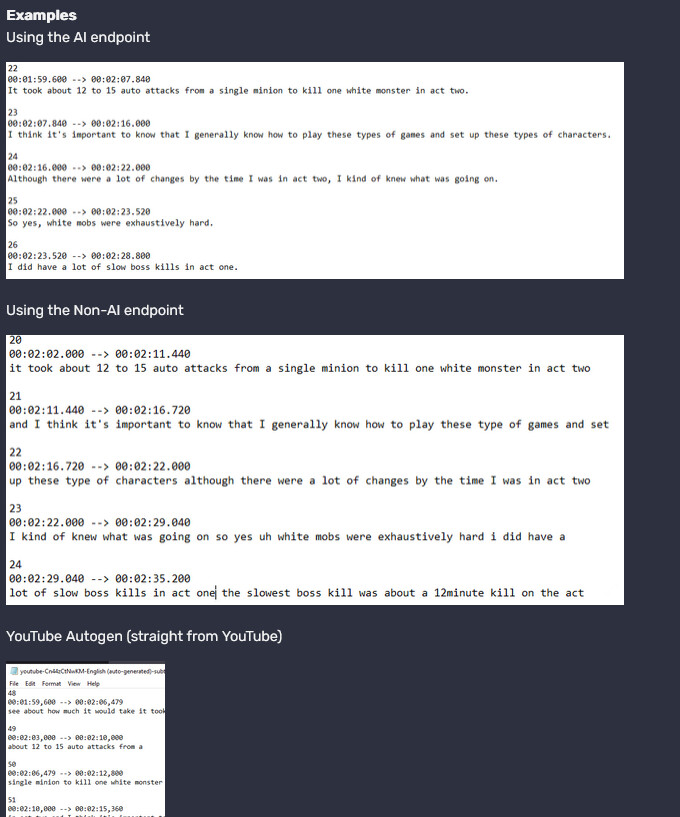
The Rooster Playlist Import and Rooster Video Tools extension handles advanced segmenting of YouTube subtitles and direct import into LingQ.

Flexible Transcription & Subtitles

YouTube: choose built-in subtitles (with Prefer Autogen), fixed-size chunking, AI-chunking (your OpenAI/Gemini key), or AI-chunking via LanguageMaster.
Whisper (LingQ): free LingQ transcription (capped at 10 hours/month).
Whisper (LanguageMaster): pay-as-you-go Whisper models (3–21 tokens/minute) with your LanguageMaster tokens.

:heavy_dollar_sign: Transcription Pricing

Mode Cap / Tokens Subscriber Rate Free Rate
Whisper (LingQ) 10 hours/month
Whisper (LanguageMaster) 3–21 tokens per minute 4000 tokens → $4 USD 4000 tokens→ $5 USD
  • Discounts available for bulk token purchases

:globe_with_meridians: Whisper Providers:

Lemonfox, Fireworks, Deepinfra, Groq, AssemblyAI, Deepgram, Gladia
Chunking Options: Original | Fixed-size | AI-chunking (OpenAI/Gemini) | AI-chunking (LanguageMaster)

1 Like