New video modes: scrolling and immersive. Access from the video button at the bottom of the reader if the lesson has a Youtube video. Tap on the full screen button on top of the video to then access immersive mode with text in front of the video.
Reader completely rewritten from scratch with improvements to performance and look and feel including improvements to images and rich text and a significantly better tablet mode.
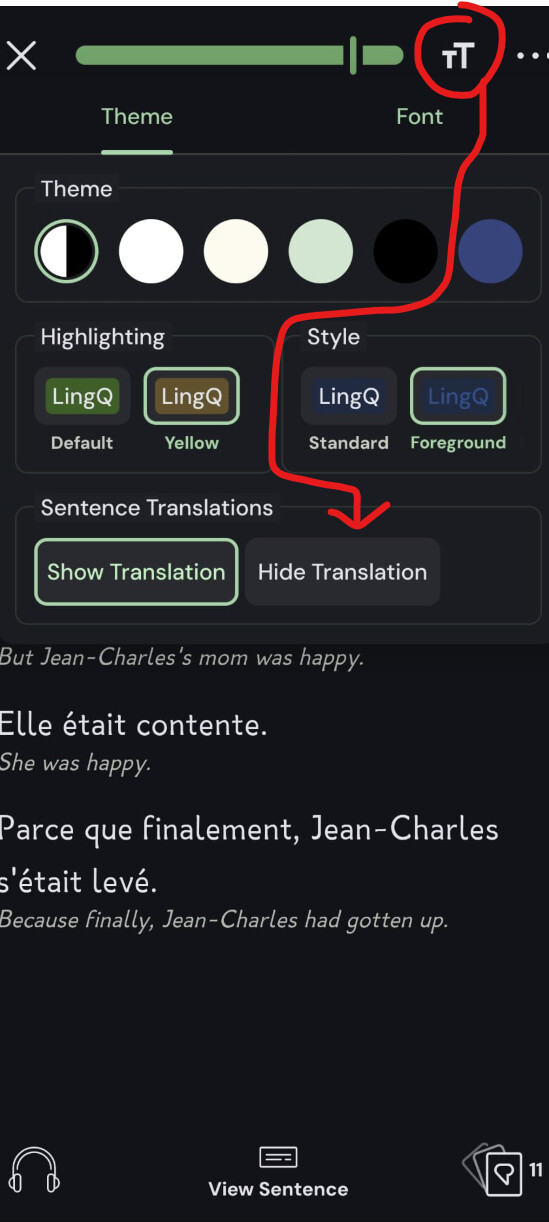
Substring sentence translations in page view accessible from the Reader theme settings button.
New lesson complete screen with more stats and better celebration of your achievements.
Significantly faster lesson load times.
Improvements to chat experience with faster responses.
Settings to enable Sentence translation and audio auto play in sentence mode.
Better stability when playing audio and text to speech.
Numerous other bug fixes and general improvements including on Imports, better offline Streak tracking, and Playlists.
You can join the beta via Google Play open track, by accessing our app Google Play page, or through Firebase Apptester programme, which some of you might be in already. Otherwise, here is the link for access:
Thanks, I just saw the beta tester option in google play app page, It worked after downloading update. App looking very good so far, I’m still exploring it.
Just started using it tonight. It’s a VERY nice upgrade. Watching videos and reading subtitles is actually usable for the first time, since you can select words and create lingqs (I completely avoided watching Youtube videos in the app since forever). I also spent some time reading a book. I think it’s a good change to include native language sentence translations under each sentence in page view, but I would like the ability to turn this off, since I don’t use sentence mode very much anymore. I couldn’t find the option to turn this off.
One bug that is still there is on the top of the library page (I’m using the Android app on my phone), it shows that I’ve done 0/400 coins today. When in fact, when you click on that message, it takes me to my Stats page showing 637/400 coins for the day. However, the in-lesson lower right corner stat button is at least accurate.
By the way, when I click the aforementioned icon in the lower right corner of a lesson, it shows the correct coins (637/400), but I’ll tell you what I really want to see there as well—the number of new known words added that day. I have a personal goal on adding new known words each day, but I can’t see it unless I go back to the main library page and then access the stats page. The lower right hand corner stats link just shows new words in that document, which is useless. I don’t care that I learned 251 words in this chapter of a book. I want to know how many words I’ve marked known today. Would love to see this implemented.
Thanks for the fantastic update and the chance to Beta test!
Honestly, wow. So far, this is exactly what I hoped for.
First note, PLEASE BRING THIS VIDEO IMPROVMENT TO THE WEBSITE VIDEO PLAYER MODE!!! This is also painfully needed, this demonstration in the beta is so nice.
Second note, (Update: Thiago already addressed this on my other post, thanks!)
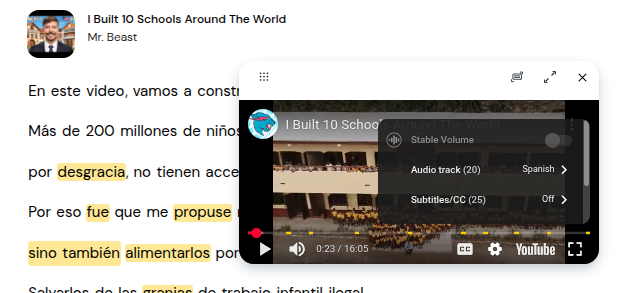
the only problem I have, which LingQ may have no ability to fix, is the ability to change the audio track (for YouTube videos with multiple audio options) in the Android app. More and more YouTube channels are multiple Audio tracks, especially with AI dubbing now included in Youtube. For example, Mr. Beast Youtube videos have many extra dubbed audio tracks for 20 languages. So I watch them in Spanish. On the website/PC I am able to click into the web player settings on LingQ’s website lesson and I find this audio track option. See screenshot below.
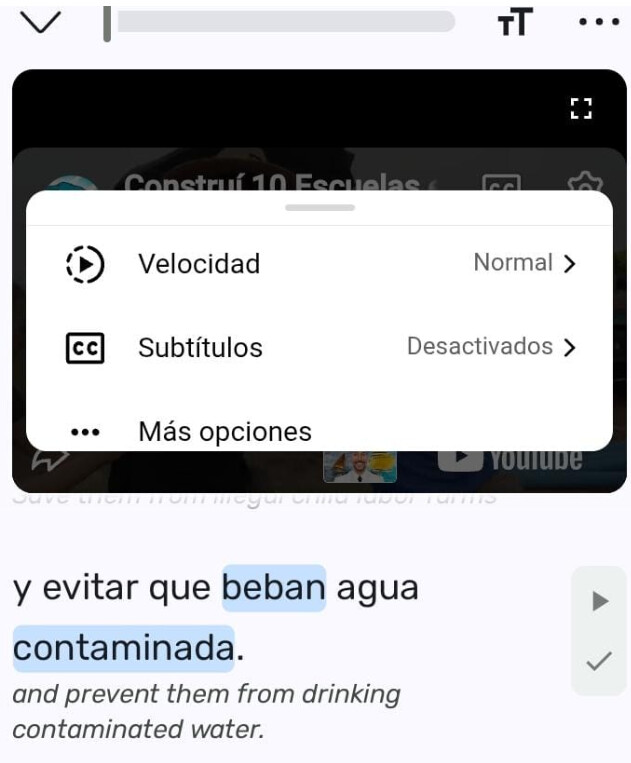
However in the LingQ app (now beta mode), I click the same settings button and there is no option for Audio track. I’ll show screenshot below. I can’t show entire menu as window is restricted. I scrolled through it entirely and clicked more options and there is still no audio track options.
Interestingly the video’s title in the Android LingQ youtube player is actually translated to Spanish, a weird quirk. I assume this is completely youtube’s fault, at least Gemini AI said it is YouTube’s fault, and that the API cannot add an audiotrack option. But I figured I would mentioned it just in case there is some developer mode options LingQ has access to when adding YouTube to Android apps that Gemini didn’t to tell me. I’ve actually never even seen the settings menu option before in mobile view so that’s why I mention it.
I tried some alternative solutions like changing my phone default language to Spanish, the extra option in the Android menu to make Youtube app language to be default in Spanish, making sure my YouTube app on my android was already logged into my Spanish account, and changing LingQ’s default menu to Spanish. No success for any of these ideas. I restarted the phone of course and the LingQ app a dozen times. So if there is a fix or a solution, let me know
I wanted to thank the entire Lingq team for the new app update. It’s simply fantastic! It’s without a doubt the best update that has ever been released. Congratulations, and I want to thank you because you are making my dream of learning English possible. I appreciate your dedication and the great work you are doing!
i just tried it and wow i got to say you guys did really great with this! I only tried it for a couple of minutes but my only feedback is that i wish you could just tap the video to make the definition go away and to resume. I had to swipe the definition away to make it go away but other then that i would absolutely love to have this on desktop asap. I noticed that it also counted my words or reading and updated my coins just fine from what i could tell. Great job!
ditto – I found getting rid of the definition a bit annoying at times.
Can someone else also please check if the “karaoke” mode for audio (not video) is broken for them? The right-hand side of the playback scrubber is stuck at 0:00 so I can’t fast forward the playback