Hi,
When using the sentence view mode, whenever the video is paused, YouTube displays the grid of suggested videos. This is rather irritating for the flow of the lesson.
Is there a fix for this?
thank you very much 
Oded
Hi,
When using the sentence view mode, whenever the video is paused, YouTube displays the grid of suggested videos. This is rather irritating for the flow of the lesson.
Is there a fix for this?
thank you very much
Oded
Not sure if there’s anything we can do here, but I’ll check with our team.
Thank you very much for the suggestion — I really appreciate it.
I tried the add-on, but unfortunately it didn’t solve the issue for me. In addition, it changed the LingQ page layout in a way that made it difficult to use, so I had to disable it.
By the way, I noticed that this issue does not occur in the mobile (iPhone) version of the app — the embedded videos just pause without other videos popping . I’m not sure if that’s helpful, but I thought I’d mention it in case it provides a clue.
Thanks again for taking the time to help.
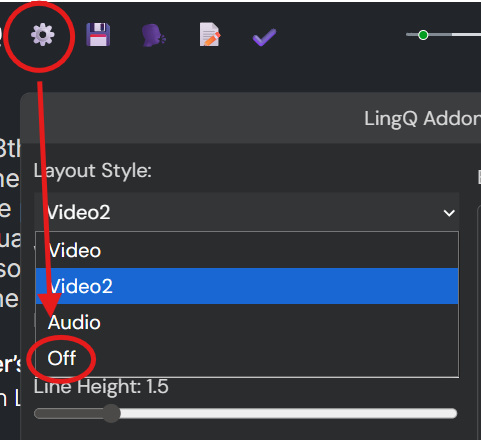
The youtube video simplification is one of the features that the add-on provides. If you want to use the default layout, disable the layout change.
If it still doesn’t work as you expected, try this script. I extract the exact feature and make a new script for youtube embedded players.
Thanks vet8t6z79pc4, I was able to find the setting you referred to and it did restore the layout but still the video was not able to pause smoothly while on “sentence view” (Strangely enough it works fine on “page view”).
Please see a reference video I prepared:
https://www.dropbox.com/scl/fi/gsdo9sycewaqrxgawk2rk/example-pause-overlay-in-sentence-view.mov?rlkey=o3j393f2tr78nyr283tbru4vl&st=qroqsq04&dl=0
First part - I show the problem in sentence view (note that the lingq add-on is enabled). Second part - I show how it functions smoothly on “page view”
…Any further thoughts on this issue would be appreciated
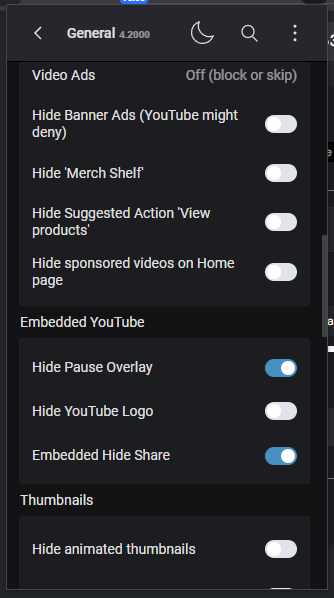
And thanks Daisy for mentioning the extension ‘Improve YouTube!’, but it seems this extension only works on the YouTube site, or am I missing something? Anyhow, I feel maybe my problem is not exactly related to a ‘hide pause overlay’ issue, because as can be seen in the reference video, this behavior doesn’t occur in ‘page view’. So, I wonder what is actually happening differently with the embedded video when in sentence view.