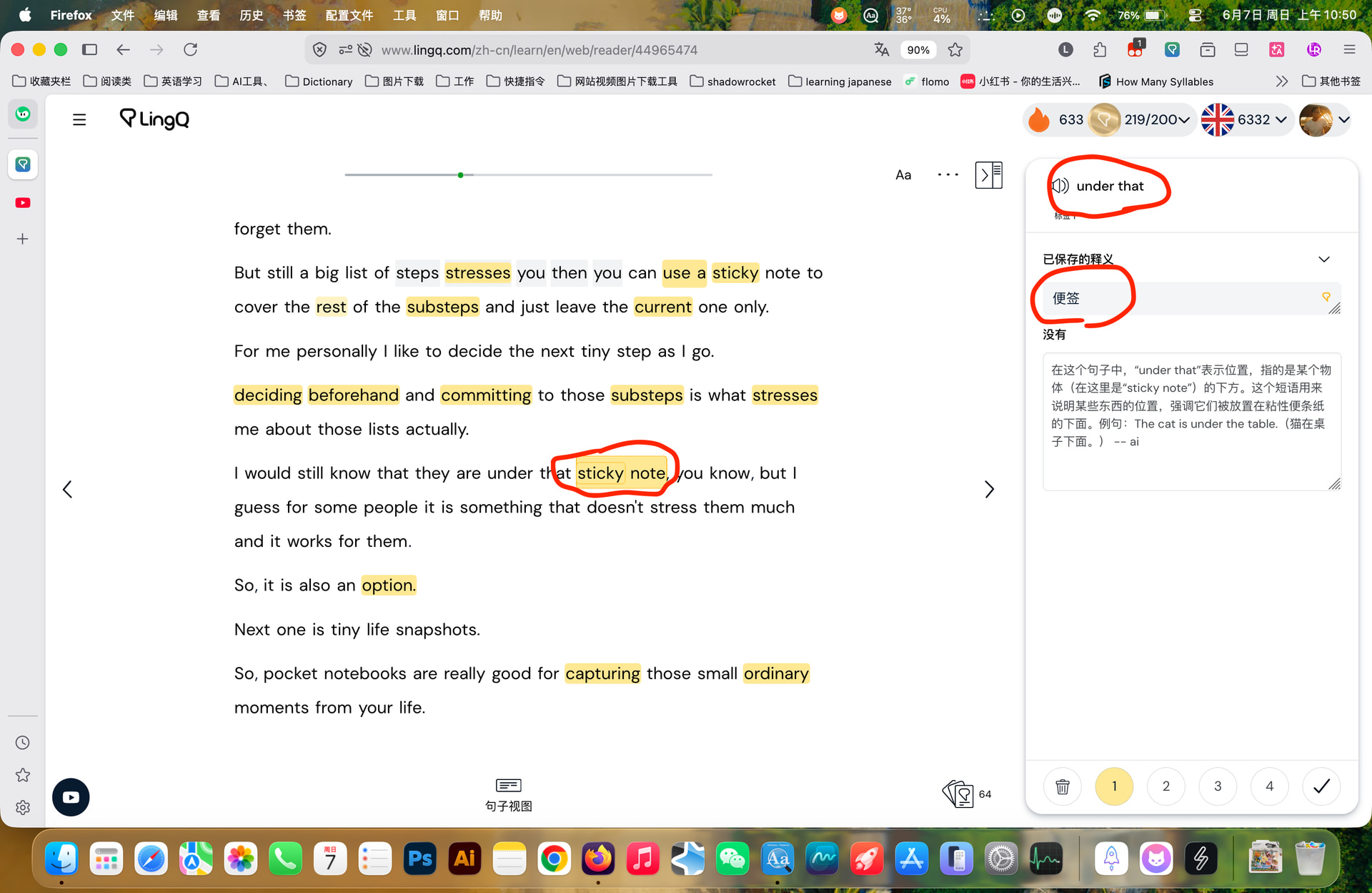
I haven’t been able to use LingQs for the last few days.
I’m using Chrome version 148.0.7778.216 (Official Build) (arm64) on Mac OS 26.5.1. If I click on a word to create a LingQ it will highlight something several lines above in the transcript. The definition in the sidebar is correct but the new LingQ is way off, e.g., “pas” is now an unknown word. I think I have that one down.
Also, when I select several words to translate a phrase, the software may add a whole bunch of other words which are unrelated.
When I click on a LingQ that I made earlier, and then try to change the level of knowledge from maybe a 1 to a 3, or simply known, it doesn’t do anything.
And everything is slow to load.
I’m still using the software but have abandoned doing any LingQing.
I noticed this issue a long time ago and kept ignoring it, but I recently submitted a feedback report; I hope the LingQ engineers fix it as soon as possible.
This problem has existed for a long time.
I agree, there is a major problem at the moment. LingQs are not recognized correctly by the system. Sometimes the definition does not match the highlighted words. And if you change a word to “known” or if you create a LingQ, the colour of the word does not change sometimes. If you reload the lesson, it works for a short time. And then the problems reappear … Please fix it soon. (MacOS, google chrome Version 149.0.7827.54)
I’m having the same issue and i’ve tried it on both safari and chrome. Everytime i start reading, at the first page it’s fine, but when i move on to the next page, for any word i create a lingq, it highlights some other random word but just not the one that i want it for.
Same for phrase translations also, whenever i select a phrase to translate, i always translates something that was preceded by 7-8 words. It has become unusable. Everytime i turn a page, i have to close the reader and open it up again for it to fix itself. And then i move to the next page, only to have the same problem over and over.
PLEASE FIX THIS! The frequency of the amount of bugs i experience with lingq is very disappointing for it being a paid service.
I’ve been experiencing the same. When creating LingQs the text in the LingQ doesn’t match the highlighted words. Also, the wrong words are highlighted in page. This is probably the most basic function of LingQ. +1 to getting this making this a priority to fix.
I’ve been having difficulty with importing lessons. I am using Firefox. After importing a lesson, it will appear to work. Soon after, however, LIngq will confuse the words. For example, if there is a phrase: L’exercice est bon pour la santé. If I clicked “bon” Lingq will confuse it for “est.” This bug makes it impossible to select the proper word, and to create lingqs. The app becomes unusable at this point, unelss I restart firefox (but the constant restarting interrupts learning flow).
@len1984 Yes, I will post an update here as soon as I get more information.
@martin_romangette What you are experiencing seems to be a different issue. What browser are you using? Can you test on another browser and let me know what happens?
It is still very buggy. The LingQs are not recognized correctly. It can be fixed for a short time by closing and restarting the lesson. But the problems will reappear soon. Please fix it.