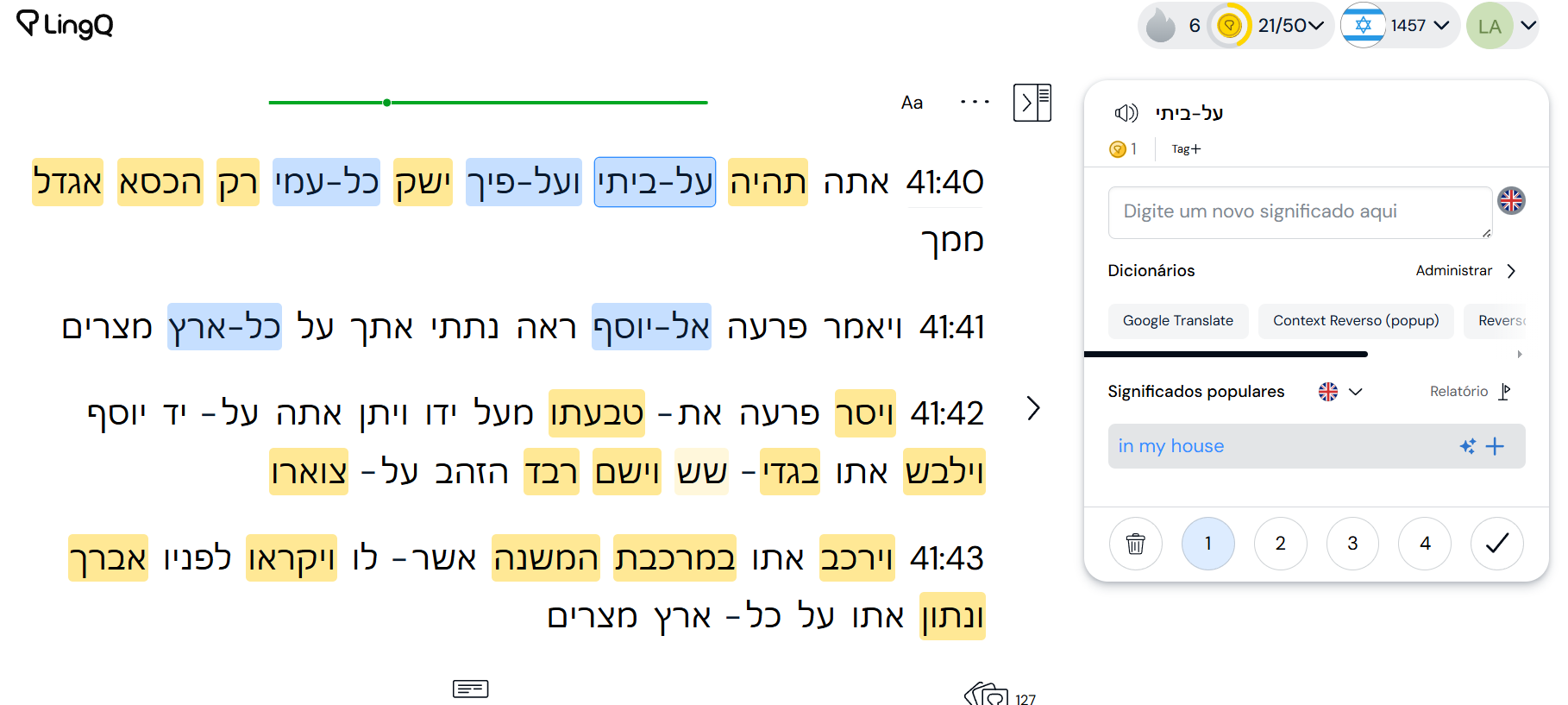
You cannot trash the word, if it’s a name for example. You cannot create a lingq either.
Version is 6.0.9 (1)
You cannot trash the word, if it’s a name for example. You cannot create a lingq either.
Version is 6.0.9 (1)
For me it is working perfectly now in the web version, on iOS and on Android. And I am so happy about it!  Just in my first French lesson review I found eleven words that will now show up with the right spelling in the vocabulary review. These are the French words for grandchildren, the United States, meeting, subtitle, … For the French language that step was necessary!
(Edit: I forgot to mention that the first step in this direction was already taken in 2023, but hyphened terms were not recognized as a word. )
A few people seem to be saying it is resolved… It does not look that way to me. To be very clear, the bugs aren’t the main problem, it’s the fact that hyphenated words are now counted as single words. I do not want this to be the case at all, I think others in this thread agree with me as well. “Red-car” is not a word. “Red” is a word, “car” is a word, but not being able to lingq “red” and “car” separately is absurd. Please don’t let the “fix” for this issue be just fixing the resulting bugs and not returning hyphenated words back to being individual words again.
This was already possible before. You just had to chunk the hyphenated word.
LingQ inherently has the problem that you get more blue words than you most probably need and there is no easy fix to this. However, making hyphens words is just the opposite. Enough that you get “grün”, “grüne”, “grüner” and so on all shown as individual words, now you get also gelb-grüne, gelb-grüner and so on as individual words. If I wanted to learn this or that the app draws my attention to this construction I could just highlight the chunk. If not, I don’t want to get bothered by something I already know. Especially for highly inflected languages this gets annoying quite fast.
If hyphenated words now count towards the total word count, will this affect the level thresholds?
The issue should now be fixed on all platforms.
Still there for Norwegian on all platforms.
As fer.weh has rightly pointed out, there are situations where hyphenated combinations have meaning that the parts by themselves do not convey, depending on the conventions of writing that differ by language. As for the ridiculous example of red-car, you would still be free to ignore the hyphenated combination and the words red and car would come around by themselves, allowing you to learn it any way you prefer. For me, a situation where the obvious bugs are removed but hyphenated words are counted as their own words, would be a perfectly fine solution to this situation.
Hello Zoran, can you please clarify what was identified as the issue and what is LingQ’s approach to hyphenated words? If the changes are actually intended by LingQ, then I guess we just have to arrange ourselves with this, but until now I haven’t seen a communication that announced the introduction of hyphenated words.
My “ridiculous” example was purposefully simple, so that it is easy for everyone to understand. I get that as you say “there are situations where hyphenated combinations have meaning“ there are “situations” for almost anything, however there was already a solution to that as @JulianiTOgo says above… just select the two words. Simple. And, as @leviarruda above rightly points out for Hebrew -
“The hyphenated words do not form a new meaning in most cases, so this new update is just annoying with no added benefit. The hyphen is mostly for pronunciation purposes, no use in considering it as a means of forming new words with new meanings.“
However now it is impossible to select one of the words. I cannot click a word and get it’s meaning anymore, kind of an important feature of lingq I would say. In fact I can’t even select the new hyphen hybrid word to get the meaning because there are precisely 0 user translations, and the AI can’t even figure it out… it thinks that “Nike-joggesko“ means “yellow”.
There’s another “ridiculous” example for you… You honestly think its better that now I am unable to lingq “joggesko“ and have to ignore the entire thing just because of the brand name “Nike”?
No one was begging for this to be done, I cant find anything in the forums about this, however in a single day there have been a ton of comments about this change… I wonder which is the bigger issue.
There is a bug with lessons imported prior to this change that have hyphenated words. In many cases you can’t change the status of the LingQs of the hyphenated words.
Yeah, the app doesn’t allow selecting individual words once they are linked by an hyphen. I’m having to manually edit the lesson and add a space between to force the separation. Pretty annoying.
In that case I would just wait for them to come around in separated form in a future lesson. If the word is common enough that it is worth learning, it will eventually show up again, and if not, no point spending time on it. If the word only occurs in hyphenated form, then that is the only one you need to worry about.
But hey, that’s just my two cents. There clearly is a vocal group who feel quite differently about this subject 
I’m happy for you that this is not an issue with the language/s you’re learning, I really am, but for others this is a big issue. Lets try this angle. In the Hebrew screenshot form @leviarruda in the 4th reply in this thread, you can see 10+ instances of hyphenated combination words in only a matter of a few sentences. Now expand this to a whole book, assuming that these are mostly not new words and are only a function of the language, in this case for pronunciation purposes, you will start a book that says it has hundreds of “new words” and find out that not only does it not have anywhere near that many new words but you have to physically click on ignore for all of them. This is a big disruption, and annoyance for no discernible reason. Just work around it, is not really an acceptable solution to a problem on a service we pay for, where this issue simply did not exist for anyone a few days ago.
@zoran Will this get fixed/reverted?
@zoran This is still not resolved for me. Latest iOS update installed. Hyphenated word combinations don’t save (as LingQ, as known, or to ignore), then progress does not sync between devices (with progress dot and progress bar remaining grey).
What is the intended functionality here? Hyphenated word combinations should not be treated as new words. If a hyphenated word has a different meaning in some language, the combo could previously be highlighted and LingQed. Now there are multiple languages that use hyphens for other purposes that are not working well at all. French reversed subject and verb for an interrogative function. These are not new words - just word order.
I just successfully synced progress. Maybe that part is something on the host side?
I’m still frustrated with the hyphenation thing, though. Different languages use this punctuation quite differently from one another…
Still not fixed for Hebrew on PC. @zoran any progress?
It’s not fixed for anyone in any language… It seems they did this on purpose for some inexplicable reason, and I’m now starting to worry that they will never put it back to how it was, because they seem to be focus on fixing the bugs this decision has introduced, instead of just reverting back to how it was in the beginning, when there were no problems.