Hi, today french words with ‘ stopped showing translations and it seems that they aren’t shown in any colour either, even if they are new words. There were just fraction where the second part of the word was working normally, but mostly they were just unreactive to mouse. Has there been some changes or is this just another bug?
There is similar issue with Ukrainian langague:

It’s from word зв’язка.
It’s really impacting.
Same issue, I can’t even click on them.
Bonjour à tous,
I noticed that words in my Vocabulary lists that start with a letter followed by an apostrophe and then the rest of the word are pronounced as if they are 2 separate words. They used to be pronounced correctly as a single word.
André
Which is super off-putting and breaks up the flow of the reading. These days I try to find good audio and let LingQ do its horrendous text transcription, rather than find good text and let LingQ do its horrendous AI text to voice audio.
Finally!
In French, it was particularly annoying that expressions such as “eau,” “l’eau,” “d’eau,” etc. were considered different words. This unnecessarily inflated the number of LingQs and “known” words.
Thank you for finally correcting this problem!
I don’t know if they have tried to correct the problem, but if they have, they have made a bigger problem while doing so. Now you can’t see the meaning of any of those words and that’s not very useful. Counting extra words is a minor problem compared to usability. It’s just a number. It doesn’t affect learning.
@Jessei
I assume that this is a response to my post.
You write: “Now you can see the meaning of any of those words and that’s not very useful." So what? You know that “eau” means water, you know that “l’” is the contracted form of the definite article. Does it give you any additional benefit to know now that “l’eau” means “the water”? That follows automatically from the meanings of “l’” and “eau.”
Or have I misunderstood you somehow? If so, please explain it to me again in other words.
I meant to say you can’t see the meaning of the contracted words at all. I know l’ doesn’t add any more information, but if the main word is unknown then you can’t see what the meaning of that word is. I tried today and I had many contracted words where the second part was unknown to me so only way to check the meaning was through translation of the sentence.
@Jessei
OK. That may be a specific problem with your browser. For me (MS Edge), lingQing the main word works perfectly.
Bonjour,
I agree that treating “eau”, “l’eau” and “d’eau” as 3 separate words to either be marked as “known” or “unknown” (ie a new word that needs to be learned) is a bit annoying. Nouns aren’t too bad but for verbs, it is a different story. Verbs starting with a vowel can be preceded by a long list of letters (c, d, j, l, m, n, qu, s, and t). Multiply this list by each conjugation and by each tense and the vocabulary list can get quite long.
It takes a second or two to mark them but once marked, they are off the “New words” list forever.
The problem is now that all of the words previously marked as “known” can’t be clicked on. This means that if I don’t know the meaning of a word (perhaps it has another meaning that I didn’t realize or I forgot the meaning), I can’t do anything about it. I can’t look it up in the dictionary. I can’t add it to my “to be learned” list. I also can’t hear how the word is pronounced in the lesson. All of these things are needed to learn a language.
André
I don’t really care about that. Better not to think too much, just move forward. You learn more if you just keep on moving. In any case I stop using lingq before I have learned all the words and just use regular books or listen actual native content. Then I can’t lingq anything anyway, but now when I’m still in the early phase it would be nice to see what is the meaning of the word, with or without contraction. Later it’s easier to get them from the context, but it this stage there is still too much unknown and even the known are just aproxmations that it’s quite hard to get some words from the context.
eau: water
l’eau: the water
d’eau: of water/watery
There are 3 different meanings. So I would like to click onto all of them separetely and assing the slight differences to them. If this annoys you, please, just presse the “delete” or “known” buttons.
I’m having the same issue both on the web and on the app. Even tried to highlight the phrase and the word isn’t listed. example “il s’éclipse vers le fond du couloir”. The highlighted phrase appeared as “il vers le fond du couloir”
Thanks everyone! We are looking into this.
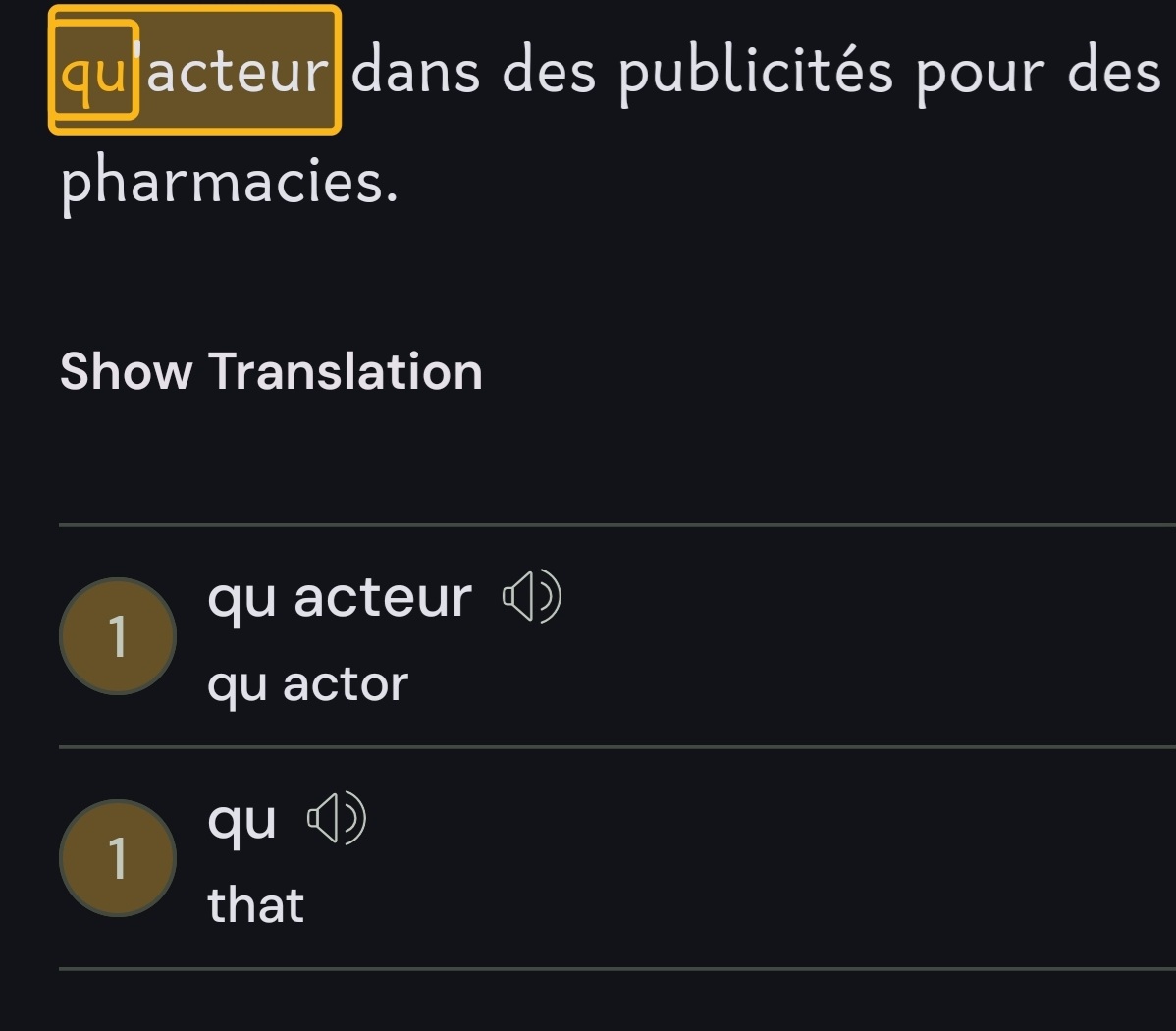
Now that I did lesson in french I noticed couple things. First, it seems like it’s words with letter that have accent or other signs on top of that aren’t shown, besides words with i or j. Although some words with those also weren’t clickable or didn’t have any colour, but it was the forementioned that seemed to lack this ability always. Second, when I was finishing lesson it still showed in the progress bar that there were 30 blue words (and there definetly weren’t in the text) which were then added to known words when I finished the lesson. I assume that it’s the words that aren’t clickable (or some of them) that are still still regonized as blue words in the program. So basically french has become unusable, unless you want to add punch of unknown words to your word count. It would be better to go back as it was and first see if the changes work before implimenting those to everyone.
Issue has been resolved for me on iPad and Chrome browser as well. Thanks! Also looks like it might have resolved the “update reading location” bug too. Nice job, Lingq team.
Have you checked that at the end of the lesson it doesn’t add extra words? It still does that to me. It seem like part of the contracted words are unreactive to touch and don’t have any colours, but still program considers them new if they aren’t ones that you have already added to know or lingqs. Yesterday I had 30 extra words added to known at the end of the lesson and today when I tried with a shorter lesson still had 1 extra at the end of the lesson. It shows at progress bar whether program still regonizes there new words so you can check at end of the lesson if it actually works. Might go unnoticed easily.
Yup, I checked the end of a lesson and didn’t have any new words it was trying to add. I was experiencing this same problem you’re describing, including several contractions not responding to touch or not being highlighted as new words. I had reached the end of a lesson still experiencing all those problems, then I left the lesson, refreshed, and suddenly the bug seemed fixed. The lesson was now showing 30+ new words which were all the contractions that were previously inactive now showing as new words. Has been working for me all day since the refresh across different lessons.
I did speak too soon on the “update reading location” bug though. Still experiencing that.