So now at the end of a lesson, LingQ pops up with two annoying modal dialogs so one must click buttons to assert one really knows words or lingqs from the lesson before continuing work.
LingQ – I want a tool, not a nanny.
This just gets in my way and breaks my concentration. I don’t care at all about your ideas on how I should learn beyond the features of Sentence View.
Do you really like going through a list of several dozen words and lingqs, then asking yourself should that be a 5 or 4 or a 4 or 3 etc, before moving on to the next lesson?
Those numbers are so arbitrary. Steve Kaufmann admits that he marks some words known, then later discovers he doesn’t know them.
The whole gradation of knownness strikes me as a waste of time and an interruption of the real work of language learning.
I consider it unnecessary, too, but tend to just ignore it and click next. Thus it only takes me an additional 2~3 seconds. However, I mainly use LingQ at PC and only occassionaly on tablet.
I wonder whether there are users who actually consider this useful? If so, it might be endurable to have this extra clicks. But if there is almost noone who desires this “feature”, then yes, it should be removed.
You can be sure that LingQ never asked any real users.
Someone high up on the team has definite ideas about how users should use LingQ and doesn’t care much if users like it.
Witness the long drawn out conflict over automatically marking all words known at the end of a lesson. This “feature” seems to be some new phase of that UX battle.
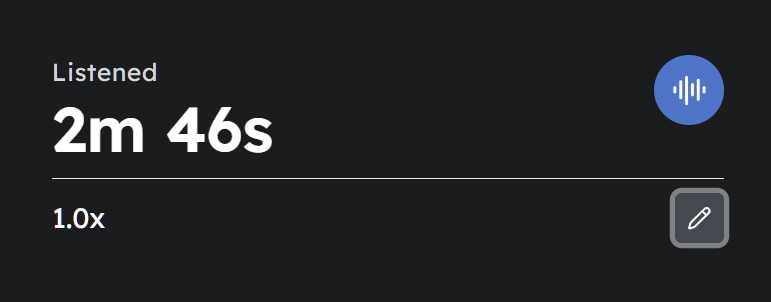
The main thing post completion of a lesson that is important (but not critical) to me is making sure the time listened is at 1x. Many times it undercounts. That is the only interaction I have with it. I don’t mind seeing the additional stats.
A way to customize items to display post-completion a lesson
A setting option to skip showing it altogether (a check box at the post completion dialog page to never show these pages again)
or there could also be 2 buttons on the last page, one to go to all through all the dialog and another to just go to next lesson skipping all the dialogs.
Depending on the course sometimes I don’t just go to the next lesson, For podcast I usually have to go back to course page to find the next interesting podcast to read/listen to.
I think since there are people who like it and there are those who hate it, some kind of settings could make everyone happy.
That’s exactly what I do: a quick review of all the newly encountered words. I’m happy those two lists are shown.
Occasionally I may find in the first list a word I don’t fully recognise, so I move it to the second list.
When reviewing the second list, I sometimes encounter words that don’t stick, even just after reading the text and checking their translations. I give them some extra attention, hoping that will help.
After that I go back page 1 and only scan for the yellow words.
I only use the Android and I don’t see where the issue is: just click Next twice, and you’re done.
Although this may be true, that doesn’t imply that the reception of feature introduced this way is necessarely bad, as the above posts illustrate. I would be more happy, though, if there would be more customization options to the LingQ interface for those who don’t want or need certain features :cough: streak :cough: to get rid of them. However, iirc it has already been stated by the LingQ staff that they want to avoid bloating up the settings menu, which is somewhat understandable, too.
A mystical feature the LingQ staff unfortunately never heard of.
LingQ can keep the settings menu simple with a switch for a more advanced settings. Or just move all the advanced setting into a dedicated advanced settings menu.
A switch could be something like screencapture below. It reveals more advanced settings when set to advanced.
I agree with you and hate this new feature. However, It only takes me one or two clicks to finish the lesson without taking note of that nonsense.
LingQ is a commercial product, they need to compete against other products, and that will drive the marketing and UI design. Thus they need to create the illusion that it is a self contained one stop shop for language learning. And a “Complete your lesson” dialog fits in nicely with that illusion. I wouldn’t be surprised if they gain a lot of users in the new year, good intentions and all that, and most drop out before the year is done. But they need the income. I’m only guessing of course. Perhaps Mr Kaufmann is minted and spends most the winter in his Florida home, and regularly jets around the world on expensive holidays living the high life.
LingQ will never be exactly what you and I want. I take the attitude that as long as it provides me with an assisted reader i.e. dictionary lookup and transcript access, I’m happy.
LingQ is a curate’s egg. It’s run by a small team, with web, Android, Windows and iOS apps to support, plus countless languages. That’s a huge workload. They do listen to users, just look at the way they interact with the forum, and they do make changes based on those comments. How many companies do that? Not many. And they put up with some quite abrasive comments too, and they’re not all from me.
I’m a Gamer, among other things. I am used to large menus with a complex structures of submenus and switches for advanced settings and stuff, and so are you, obviously, and a lot of other persons around here, too. However, it seems to be the impression of the LingQ staff, that this doesn’t apply to the majority of their (potential) users. Are they correct? I have no clue. Do I have to get angry about an addition that causes me to perform one or two extra clicks after having spend half an hour or so reading through a lesson? I don’t think so.
It’s completely valid that the op brought up the matter and I am actually on the same page. I just try to see things from other perspectives besides those that is my own.
This is software designers introducing a Brand. New. Feature. to prove their continued worth. They are the same as those hospital administrators who have attached themselves to the health care industry and the money spent on admin in medicine has gone from 15% in the 1970s to 40% today.
I get it that Lingq is a commercial enterprise, but it is also a community and a resource. Introducing new languages, updating dictionaries, etc – that’s a good use of resources. Please not another Brand. New. FEATURE.
They have also removed a feature that I really like and use it frequently. At the end of the lesson, I get to see the unknown words that I looked up in a lesson. I could copy and paste these words into ChatGPT to create more dialogues with such words and import them as lessons to see how they are used in different context. Instead, now all I see colorful statistics. If I want to take a quick look at my stats, I can do that under my profile at my own choice and time. Useful features are replaced by I don’t know colorful interface that adds zero value to language learning apart from irritating you endlessly. This is for web version.
They’re working in that direction on that apparently.
See
“But, we will be adding an interaction with Lynx at the end of lessons and from there you should be able to ask Lynx AI to generate those sentences for you and eliminate a few steps. We should have that out in the next few weeks.…”
I actually think this feature is pretty good. I certainly won’t use it all the time. But when it first appeared, I gave it a try and actually found two words whose meanings I wasn’t 100% sure of. Otherwise, they would have just disappeared into the “known words” list.
If you don’t like this feature, you can just click it away in a flash. I can’t understand why those two seconds should interrupt anyone’s concentration, especially after the lesson has been finished.
I can understand why some people wouldn’t like this feature, especially the multiple clicks to wind up a lesson. I think I’d prefer that the new known words and new LingQs all appear on one page (instead of two separate pages) at the end of the lesson. But, as a whole, I really like being able to see all my new LingQs and their definitions again before I close the lesson. If I read a few chapters from a book, then by the time I’ve reached the end of the lesson, I’ve already forgotten the majority of these words, and this gives me one more contact point with the new words before moving on.
to each their own! i thought it looked pretty nice tbh it was nice seeing a summary of the time you spent on the lesson as well as a summary of your stats and some people may find it helpful to do a little review after the lesson but it seems fairly easy to just hit next a couple of times. I think if many people find it annoying it could be changed in options down the road. I did notice the study time was off but i think this bug was already brought to their attention