What's happened to the "Re-split text with AI" option after the new update?

Hi,

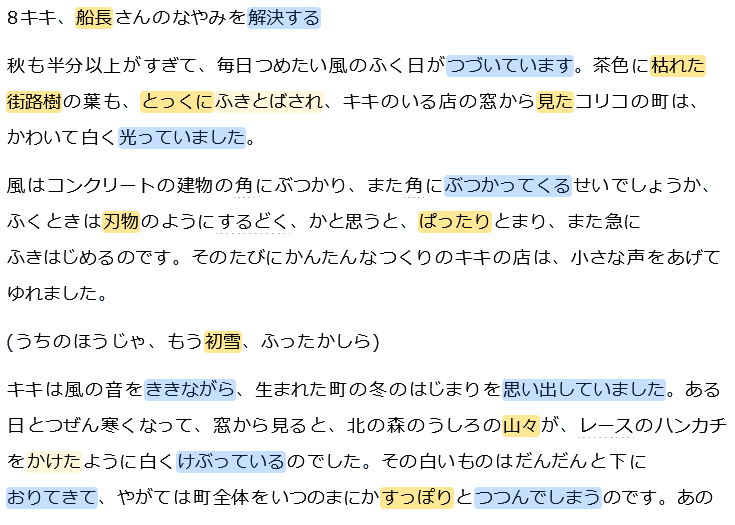
I find the default word-splitting for Japanese text doesn’t work well for me, but the old “Re-split text with AI” option always gave me consistent and usable results. After the new update I can’t seem to find a way to access the “re-split” functionality any more. Is this just an oversight, or is there an option hidden away somewhere that I’m not seeing?

Thanks,

Mark

6 Likes

I’m getting really exasperated, I’ve been dealing with bugs with that feature for almost a week, and just as this issue gets solved the feature disappears entirely.
For the last three days I’ve been reading japanese with broken parsing which almost makes me want to revert to using other tools, but of course I’ve paid for a yearly subscription on Lingq, and I have to force myself to use it in order not to burn my money. As a consequence I’m reading half as much as I probably could due to my motivation going down.
While far from perfect Lingq works really well for romance languages in my experience, however languages like japanese and cantonese feel like they’re getting no attention at all, there is always something going wrong with them

1 Like

It’s very disappointing that they don’t seem to be looking at restoring the feature. It disappeared a few months ago as well and was restored a while afterwards, so I’m keeping my fingers crossed that the same will happen again.

Failing that I’ll probably start investigating alternatives, though like you I’m stuck with a subscription that now lacks one of the features that was the reason I signed up in the first place :frowning:

I’m sure this issue is just an oversight and this feature will come back, but what’s really frustrating is the lack of any feedback from the team, not even a single sign of acknowledgement.
How are you supposed to plan a study routine and stick to it when a tool’s functionnality changes without warning and you’re left in the dark as to what the situation is?
This is genuinely disappointing.

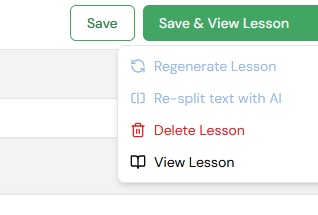
you can go into a lesson manually, click the 3 dots and there is an option to regenerate with ai im not sure if it does the same thing. Hopefully they improve the new import because its nice but yeah it was really nice before being able to edit all the setting when you import

Using that feature doesn’t do it either, in fact I’m unsure what the difference between simply regenerating the lesson and using the AI lesson regeneration feature is, but it doesn’t affect parsing, at least not meaningfully.

Earlier tonight I had an answer from Zoran to an email enquiry I sent, he said the ability to use AI parsing was to be restored next week.

1 Like

At the moment we won’t be adding Resplit with AI option back, as we are planning to make an alternative solution. We are looking into this at the moment.

Here’s word for word what I got back from support yesterday…
This feels like emotional abuse

Re-split with AI feature for Japanese will be added back next week, we are working on it.

Regards,
Zoran
LingQ Support

Of course I’m fine with different solutions being explored, what was there before wasn’t perfect and I’m willing to see how things evolve and potentially improve, but this lack of clarity and feedback makes it very difficult to use Lingq on a day to day basis.
I’m currently doing my best to keep reading japanese on Lingq, thereby getting used to how things currently are. Next week things will change again, in what way? I don’t know but I’ll have to adapt yet again. And how long before something else happens?

在新功能没有开发出来之前,能不能先把ai词汇分割功能开放出来,这个功能为日语这种黏着语带来的便利是前所未有的,但是现在没有这个功能,页面模式下的词汇简直一团糟,我比以往失去了学习动力

1 Like

It’s been two weeks since this issue was first reported, and there’s still no improvement, is there any news?

To give you an idea of how bad it is, here’s what it breaks:
Many “Words” as they appear in lessons are not actual words but groups of characters that don’t have any inherent meaning. This in itself impedes reading by adding visual clutter.
Those “words” have to be systematically ignored, which, when that number is high slows down reading considerably and fudges the numbers of learned words.
Occasionally those groups of characters that get parsed as a single words will be an entire clause or sentence. This impacts reading statistics and renders the use of a tool like lingq completely pointless for that entire passage.
Words are often grouped into a single token with the following characters, which makes the vocabulary window useless, the word itself likely has a number of good user generated definitions, but those tokens do not.

Is it unusable? Not entirely, but the benefits of using lingq for japanese over simply reading freely in a browser are extremely limited right now, and the disadvantages are headache inducing.
I’m already questioning whether or not I’d want to keep my subscription going when it expires, but if this doesn’t get fixed soon I will have no choice but to ask for a refund.

The Re-Split text with AI option has been added back. You can find it under the dropdown menu at the top right of the editor.

3 Likes

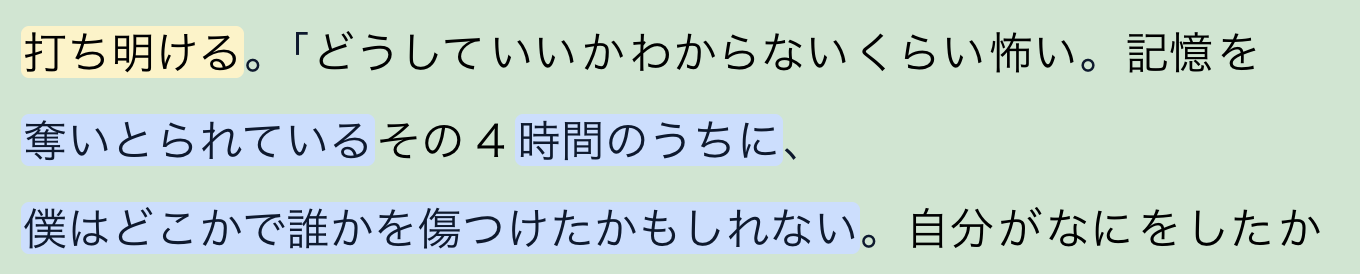
这个功能回来了,但是并不完美,图中这些蓝色单词,拥有大量后缀的词汇依旧没有分割,在上一个版本是会分割的

1 Like

Thanks for the quick update, but while it does change some word boundaries around many of the mistakes remain, and when I browsed some pages that I already completed to compare with before I found that when changes occurred it usually introduced new mistakes as well.
However I think it now does a better job with nouns. I’d say right now the result is just marginally better, but it’s nowhere near where it used to be before the update.

It takes surprisingly little time to process too, just a few minutes as if the page was simply re-generating the lesson, and when I tried to use it on an already completed lesson I found that the option was greyed out until I added some changes and saved them.

I’ll wait a while and then try again in case it’s just not fully updated yet

edit: Actually I tried with lessons of various length and from different sources and I’m not sure I can even describe the result as “marginally better”, it looks like the option isn’t doing anything currently besides re-generating the content.
Why was this thread marked as “solved” before anyone even had a chance to try it?

@sentionaut We will investigate this further, thanks for your feedback.

1 Like

yes i just tried this out for myself and the new word counts didn’t decrease at all like it used to. I tried it on 2 different lessons with the same result

Thanks guys, it might help to get actual examples of the issues. If it’s just that we overgroup verbs together, that’s a specific choice we made. If there’s some sort of punctuation that causes all words in the sentence to be grouped as a single unit, that’s a bug we would definitely fix. Can you please provide more information?

I think grouping verbs together is fine when it involves regular compound verbs, but if the algorithm has been tweaked in order to ensure those were detected then I believe it’s acting a bit too liberally, take a look at these tokens from the last few pages of my current lesson :
見せつけてやれよ
はっきりしていた
引き離されそうになった
ぶつかりそうになりながら
気づかないわけにはいかなかった

And look at this simple example : 巻き返してきた
It’s currently tokenized as one word, but at some point you have to distinguish between compound verbs and noun phrases

I don’t think it really makes sense to tokenize things such as this together either, like the current parser does :
noun+する, noun+だ
There are many inflected forms for both of those, and if you multiply all those forms with every possible noun you get a ridiculous of “words” that don’t really make sense as a unit outside of some idiomatic forms perhaps.

Not to mention this can also compound with the issue above such as with this token from the same lesson : 叫びっぱなしだ

This was regarding the verbs.

Other issues are with vocabulary and idiomatic phrases detection, I could be wrong but I remember the previous parser doing a much better job with this.
With the current model I frequently have to re-group things together because they get split.
A simple example, the book I’m reading has man occurrences of the word 吸魂鬼 which used to be detected just fine.
But now it sometimes appear as 吸魂+鬼 or 吸+魂鬼, both of which create words without meaning (吸魂 and 魂鬼)

There is also another issue, I remember the previous model being able to parse works written using older spelling, or unconventional grammar, at least to a better degree. I’m currently reading a modern book, which is where I’ve taken those examples, but when trying to read older works the quality of the parsing seems to worsen considerably, something that I felt wasn’t an issue before.
Maybe someone else who is currently reading such works on Lingq can share their experience.

So to summarize, since the re-introduction of the feature I haven’t encountered any full clause or phrase being tokenized together, so it seems that it did fix some issues, but the parsing of verbs and particles still remain overzealous (which as I said before also impacts the quality of the suggestions in the vocabulary window) and vocabulary detection still remains less accurate than it used to be.

Thank you for looking into this, hopefully other people can also come forward to describe the issues they’re seeing.
Link to my current lesson : Login - LingQ

1 Like

This just happened to me too (again). I was actually having a different problem with the audio underline not showing in a lesson and after a few attempts regenerating timestamps, then regenerating lesson and finally re-splitting with (new?) ai, this happened.

Here is the first page of a text I had already cleared, now “re-split” and full of blue words because it has decided not to split now at て,する and even ながら.

(Note: it had been re-split with ai previously, successfully. As most people know keeping the regular parsing the app quickly becomes unusable, as it has even worse parsing than this new ai and even keeps full sentences as words, something I confirmed when I attempted to re-upload the lesson and the ‘regular’ parser made that whole first sentence blue.)

Additionally, both re-split and regenerate functions are now greyed out for me, I want to think because they’re being fixed.

Suffice to say I can’t move forward with this lesson until it can be split correctly. Even if I reupload the features are not available. So, I must stick to anything uploaded and re-split with AI previously which thankfully I have but I fear for anyone who doesn’t.

I think at this point if it hasn’t been said it should. Japanese on LingQ only works with the re-split with AI function (and even then, it has quirks but they’re slight and forgivable) I was lucky I got LingQ when this feature was already in place. Removing it or modifying it essentially kills Japanese functionality.

I look forward to this being fixed so I can continue studying. :slight_smile:

Here is another example. Login - LingQ
Usually I would expect the number of unknown words to drop by 50% or more, instead it’s gone up from 176 to 189 words. It seems, everything between a number and a dot becomes an unknown word.


Here every after a number has become 2 words because of a comma.

1 Like

Additionally, both re-split and regenerate functions are now greyed out for me

They’re greyed out because the page usually expects some change before the re-generate feature can be used, and since the re-introduction of the AI parsing feature it is also subject to the same limitation.
If you want to use it add some text (even just a single letter) into the description field, save the lesson, and you’ll be able to click them again.

This is what makes me suspect that currently the AI splitting feature is simply re-generating the lesson, since both features behave the same way (they even take the same amount of time) and give comparable results

1 Like