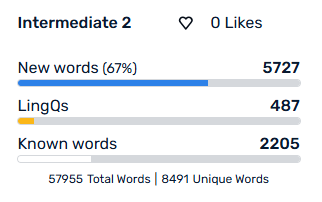
It would be helpful to have the vocabulary lists (currently available inside a lesson) to be available for an entire course. Especially considering books are imported by chapter, so to find a vocab list for the book, I have to click into each chapter.
I’d like to be able to click on this and see what those words are:
New (unknown) words won’t show under Vocabulary. Those are the words I’m looking for, so I can learn some of them before reading a book, or mark them as already known if I know them. Currently, I’m having to go to every chapter of every book to accomplish this.
It is a good feature if they add it, good for getting more accurate stats quickly. In order to boost up my known words stat to be more accurate, I had to import a huge frequency list of words as a lesson and go through it marking all my known words.
Or you can turn highlighting off like a nomal ereader and just look up word as needed.
So in this approach you consider all words known until you look them up but, yes it is a worse experience than a normal ereader since a normal ereader you leave that new word highlighted.
If you want to mark your known words, it shouldn’t take long to flip through the pages of a course, marking the words you already know as known words. (Of course ensure automatic move to known is disabled.)
Side effect of that is that it adds to your Words of Reading count making it inaccurate.
We can also open a lesson and click on show sidebar and then click on new words tab but even then it doesn’t show all the new word for the lessons. still have to page through to update that list. That also adds to Words of Reading count.
Right, but it’s annoying I have to do that when it’s an easy feature that LingQ could add, since they already count those words, both within the lessons, and at the bar at the top of the course. It would be simple to show it in the same place they show the bar in the attached screenshot. Everything is already in place, it would be very little work for a large QoL improvement.
There are always workarounds, yes, but those extra 10 mins multiplied by the number of users multiplied by the number of books per user is a huge amount of time that users would rather spend actually learning the language.
So this addon removes the left right paging button for page view. So all the lesson text is displayed in 1 long scroll. It seems like under the sidebar it display all the new words for the lesson. Just lesson only, so still will be good if there is something for whole course.