Hi, so i have noticed that when i listen to an audio from youtube on the mobile android app it has a real time audio transcript. However i often am just listening to the youtube audio and not reading, and i find when i am done with the video im credited with thousands of words read for the day. I then have to manually remove the words so my metrics arent messed up. This works fine if the youtube video was the first thing i did that day but not at all if its the middle of my day and ive already done actual reading. The only work around i have is having to convert YouTube vids to mp3 and uploading it. But surely that cant be the answer, we should be able to temporarily turn off the teleprompter. Thank you.
Thanks for reporting. We will look into this.
No problem, is there a setting to turn off that live subtitle thing that is lingq feature and not youtubes?
I think the issue is more general and seems to be a new bug: I imported a YouTube video yesterday evening, today I went through part of the text in sentence mode and watched the first few minutes - which is what I tend to do with imported videos, without any particular issues with the amount of coins this generates - and suddenly I had more than 150,000 coins. According to the activities statistics, I had spent more than 500 hours watching that video just today.
Okay ive never experienced that before LOL. That’s even crazier then whats happening to me. Im just getting full reading credit for those lingq subtitles. But that’s actually crazy.
Crazy it is. I’ve had 800 hours of listening practice since this morning and have racked up a few hundred thousand coins. I should be fully fluent in Madarin Chinese by now!
I always told people that if i could just stop time then maybe i would have enough time to finally study a proper amount. I guess youve unlocked the secret to maximizing the 24 hour day!
@ohammer @ElDorBrado Thanks guys, I appreciate your feedbacks here and forwarded them to our developers and testers. We will get it sorted out.
@ElDorBrado Thanks for the suggestion. Regarding YouTube lessons, unfortunately, background audio playback without the video being visible isn’t something we can support. YouTube’s API policies don’t allow third-party apps to separate the audio from the video or play YouTube content in the background when the video player is hidden or the app is minimized. Because of that, the video player needs to remain visible during playback.
@ohammer Thanks again for the report. We’ve tried to reproduce this with various configurations, but haven’t been able to trigger it on our side so far.
Could you please let us know which platform this occurs on — iOS, Android, or Web — and, if possible, share a link to one of the affected lessons? It may be related to a specific lesson, so that would help us investigate further.
Thanks for your reply. However i am not requesting the ability to listen to the audio without the video playing. Just simply to listen to the YouTube video without the lingq rolling transcript under it. Due to the fact as the words continue lingq thinks im reading them. So if there was a way to disable that feature thats all id request. Im terrible at explaining things, perhaps i need to include a screenshot.
@ElDorBrado Thanks for clarifying - you explained it clearly. For this use case, the playlist is probably the easiest option. You can add a lesson and play it there without the rolling transcript, unless you open the player in full-screen mode. I’ve attached a screenshot showing where to tap.
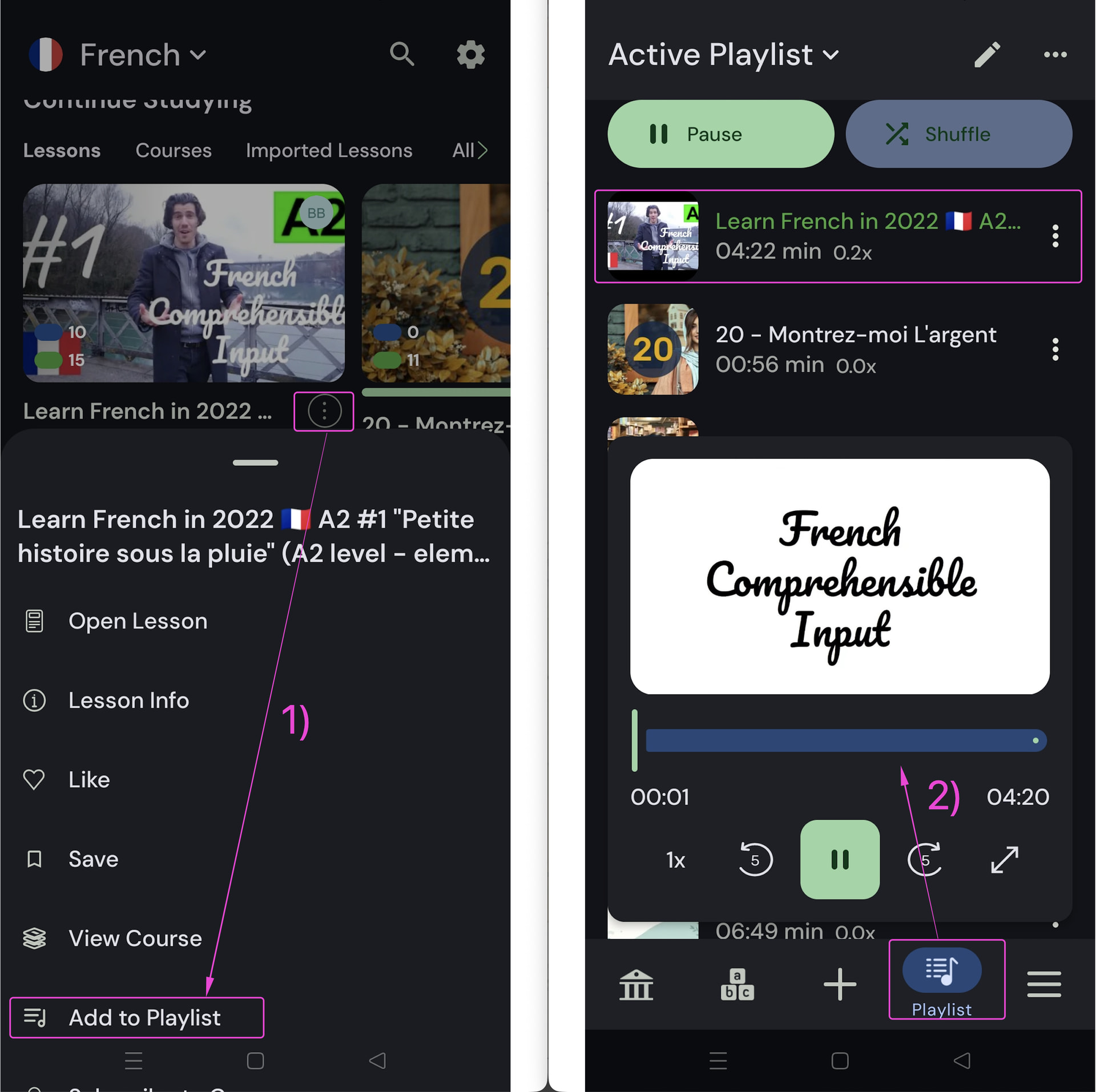
Thank you so much for that tip. I was using that feature for regular podcasts and i didnt even consider adding youtube videos to it. Thats exactly the feature i need 