Hello. I’m Swedish trying to learn German. Have used the app for about two weeks and in general I like it. But it annoys me that so many words are translated into English when my learning language is Swedish, is there a way to fix this? Currently I’m spending a lot of time editing translations, time I would rather spend learning.
Hey,
I think the reason you’re seeing mostly English translations is that LingQ’s translations are built from years of community contributions. The vast majority of users have been learning through English, so most of the saved translations for any target language end up in English.
There is an option to change the translation language by clicking the flag next to the word (on desktop), but as you can see in the screenshot I attached, for Russian content it only shows English and Hungarian — no Swedish.
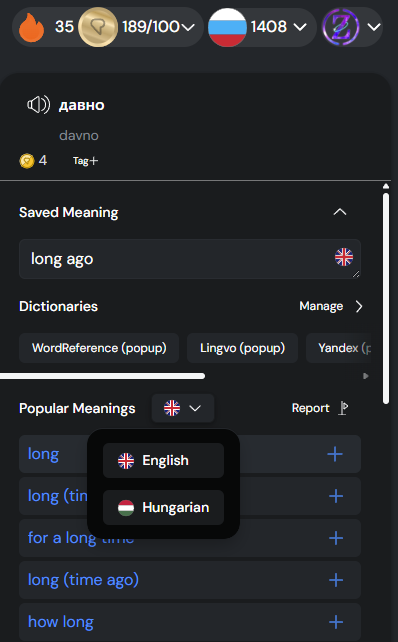
You’re basically in the same situation early LingQ users were in when they had to manually create English translations for everything. It’s definitely a time sink having to edit every word into Swedish.
Hopefully AI will solve this soon and give us proper contextual translations in our native language. That would be a huge quality-of-life improvement.
The languages shown in the dropdown menu depend on the language settings of the user, not the languages, translations are available for. That there are English translations been shown despite the users language isn’t English is most likely caused by other users with the same language settings that have used english dictionaries besides those in their native language and have copy&pasted those english translations without changing the language setting of the definition (understandable, as it is extra work that doesn’t benefit the user).