Looking back at 2025

2025 has been an interesting year for us at LingQ.

In the first half of the year, we focused on behind-the-scenes improvements that are not very visible, but that will help us maintain and improve the product more quickly going forward. In the second half of the year, we shifted back to shipping user-facing enhancements, with a major focus on AI.

One thing we have always believed is that you learn best from content of interest. That often means content you find elsewhere, and we want LingQ to be the place where you use that content for language learning.

Until recently, there was a limit to how much we could help with your specific imported content. We could offer dictionaries, conjugations, and text-to-speech, but we could not reliably provide deeper, context-aware learning support across an unlimited library.

AI changes that. This year we firther enhanced context-based translations for both words and sentences, along with Explain This in the LingQ widget, which lets you ask for clarification on any word or phrase as you learn. We plan to build on these capabilities even more in 2026.

We also launched AI Chat, which can make language learning feel less like a solo activity. You can jump into a quick conversation, get immediate feedback, and keep practicing consistently.

We also refreshed our homepage and branding. If you have been with us for a while, you will have noticed this. We hope you like our fresh new look as much as we do. This will continue to be rolled out over the coming year.

In 2025 we added Thai and Irish Gaelic, and expanded what you can import through the browser extension. You can now import from TikTok and Amazon Prime, as well as YouTube Shorts and YouTube Music. Our goal is to make it easier to keep all your learning activities in one place, and to track your progress better no matter which content source you use.

We also introduced our new Plus tier, with additional AI capabilities, higher transcription and text-to-speech limits, higher-quality AI voices, and enhanced AI Chat modes. Thank you to everyone who has upgraded and supported these improvements.

Most importantly, thank you for being part of LingQ. Your support, feedback, and encouragement make a real difference and help keep us moving forward. We know there is always room to improve, and we are committed to making LingQ better in 2026.

We wish you all the best in the new year, and happy LingQing. See you around the community.
23 Likes

Thanks for your dedication and improvements with LingQ. Happy New Year to everyone at LingQ!

6 Likes

Thanks for Irish Gaelic. I’m a few hundred days in.

Please support sentence mode far more. It’s core to comprehensible input. Shortcuts in the app (and modifiable ones too). Shortcuts in offline mode for flights because it just doesn’t work.

AI chat is useless without the base language.

As a multiple lifetime subscriber, some of what you offer is not practically available. Much of the rest isn’t high priority.

That’s a mixed overlap between what I want and what you offer. It’s not clear you are meeting what people want but hopefully that’s the direction.

4 Likes

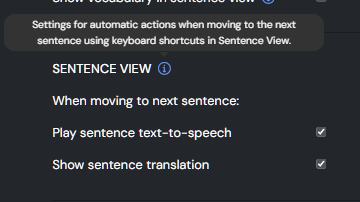
One thing we have added recently on web are settings to enable auto sentence TTS and translation when paging in Sentence view. This will also come to the mobile apps soon.

Not sure what you mean here.

3 Likes

Didn’t know about the autoplay feature for sentence audio Mark. Thanks to the team for this - very useful for me!

2 Likes

With YouTube videos, the audio isn’t playing; only the translation is appearing in sentence review mode.

Great work LingQ team. I use LingQ every day for two languages.

2 Likes

Can you share the url of the video causing you problems?

1 Like

I hope this feature can be added to the mobile version this year, allowing users to click on words in videos to look up their definitions. Many other apps already support this function.

2 Likes

Thank you for adding this.


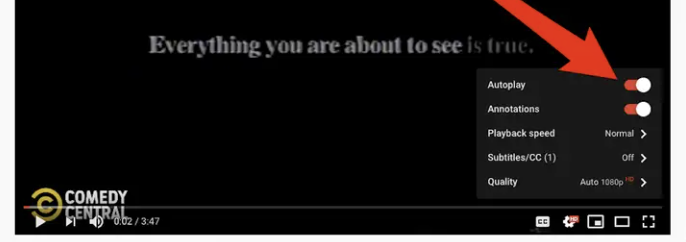
Autoplay might be useful in Edit sentence mode too. It could be affected by the above sentence view setting or It could just be a setting in that edit sentence page similar to how youtube does it.

This feature in sentence visualization only works when the lesson contains only audio or when the lesson has neither audio nor video and is spoken by artificial intelligence.
When the lesson is from a YouTube video, this feature does not play automatically; only the translation appears. This is happening in all videos.

We have this on our roadmap for the year.

2 Likes

It is working for me so please share the video or videos that are now working for you so we can try and figure out what is happening to you.

This video for example

This is great! This has always been a challenge for watching and learning from videos on mobile devices.

@joseeduof Thank you for your feedback and the additional information. We’ve noted the issue where video playback does not start automatically in Sentence View mode and are working on it.

1 Like

I’m the one who should be thanking you for this new feature!
This tool will greatly speed up the process of studying with YouTube videos!