This past month we launched the LingQ Cup of Languages 2026, our biggest community event of the year, across Web, iOS and Android. We also added right-to-left transliteration for Arabic, Persian, Hebrew and Urdu, rolled out Course Subscriptions to everyone, and shipped a long list of reader, import and Lynx improvements and fixes.
Web
The LingQ Cup of Languages 2026 is here. Join your language’s team, earn coins for your daily activity, and climb the global and team leaderboards. You’ll find daily prize claims, participation and active-day badges, and live Top 50 rankings. Look for the Cup banner in the Library or the entry point on the Challenges screen.
Skritter has been added as an integrated vocabulary export option on the Vocabulary page for those of you wanting to practice writing Japanese and Chinese characters and words from your LingQ database. Soon to be added for the mobile apps as well.
Course Subscriptions are now available to everyone. Subscribe to any course and you’ll get a daily notification when new lessons are added, so you never miss new content from your favourite sources. You can now subscribe directly from a lesson tile, not just the course page.
We added right-to-left transliteration for Arabic, Persian and Hebrew, making these languages much easier to read for learners who don’t yet read the script. Urdu is included as well.
We cleaned up some Japanese transliteration issues and cleared up Chinese audio TTS that was missing characters for some words and phrases.
We fixed a range of issues, including: Plus users being unable to use Simplify on lessons, a false “Limited translation available” popup, being unable to add tags to a course, lessons failing to open for some Chinese/Japanese/Korean content, and excessive memory use during audio playback that could crash the browser.
iOS
The LingQ Cup of Languages 2026 launched on iOS with the full experience: team challenge hub, sign-up and opt-in, daily prize claims, badges, and Global and Team Top 50 leaderboards.
Right-to-left transliteration is now shown in Lynx for Arabic, Persian, Hebrew and Urdu.
We improved YouTube importing so regionally tagged subtitle tracks (for example “French (French)”) now bring in the correct original subtitles instead of auto-generated ones.
We fixed several issues, including: incorrect highlight height for Japanese/Chinese/Korean words in Lynx, daily goal and milestone notifications not appearing on the Lesson Complete screen, Lynx not respecting your selected model when starting a new chat, a blank Language Stats screen when tapping “View all”.
Android
The LingQ Cup of Languages 2026 launched on Android, including a tablet portrait layout, with the full challenge hub, leaderboards, daily prizes and badges.
We added right-to-left transliteration for Arabic, Persian, Hebrew and Urdu in the Reader, Vocabulary, and Lynx.
The Subscribe to Course button now appears on lesson tiles as well as course pages.
We fixed a number of issues, including: Plus voices being incorrectly locked, lag when displaying word meanings in large lessons, crashes when opening a lesson offline, flashcard text-to-speech not autoplaying after flipping a card, some courses not displaying their lessons, and Add/Ignore/Known buttons not working in video mode on tablets. We also fixed text-to-speech using the wrong voice in some cases.
I’ve been really enjoying the LingQ Cup of Languages this year. It’s been motivating to see so many people actively working on their target languages, and being able to see other users’ and teams’ stats adds a fun competitive element between languages. It feels like a positive step toward building more community interaction on the platform.
I don’t currently have any plans to study Arabic, Persian, Hebrew, or Urdu, though Arabic and Hebrew do interest me a little. Still, I appreciate the improvements being made across the board.
I haven’t spent much time exploring the LingQ library yet, but I really like the new course subscription feature. Getting notified whenever new lessons are added seems like a great way to stay consistent with structured content.
Also, the improved support for practicing characters in languages like Chinese and Japanese is exciting. Those are both languages I’d like to learn eventually, so having better tools for that is really useful.
Is there a way for a course creator to see how many subscribers a course has? And is there a way a course creator can shut down the subscription option, when they are sure that the course won’t get more lessons?
I think the LingQ cup of languages has been great and I’d love to see more like this. Could also align with the Olympics and other international events to do one of these each year
Sorry, but that is not the same information. When I have a look at one of my courses, I see that the first lesson was opened 332 times in the last four years. Other lessons in that course were opened just 86 times in the same time. I don’t know how many active LingQ users would like me to continue the course. I would like to know this specific number to prioritize courses, when I add lessons. And the number of followers shold exclude users who delete their account.
I absolutely love this update. Logging in each day to see what kind of bonus ill be getting has been great. Ive been slacking on listening a lot lately but if theres a bonus for listening that day ive made an effort to find more content to listen to. My own thing is i wish you could join multiple teams. Its a shame you can only pick one language.
Cup of Languages has been epic. Love supporting my team and seeing teams jostle for position. I wish there was like a chat or forum dedicated to it. It’s like we are all silently participating. I want to talk to my team lol
@bbbblinq Can you share a screenshot or describe in detail the message you are referring to (where in the app it shows, what it says)? This will help us investigate and fix it so you don’t keep seeing it.
On Android, I’m unable to permanently turn off transliteration for the mentioned languages. Whenever I toggle it off, it defaults back to on the next time I open the app. Could this be fixed?
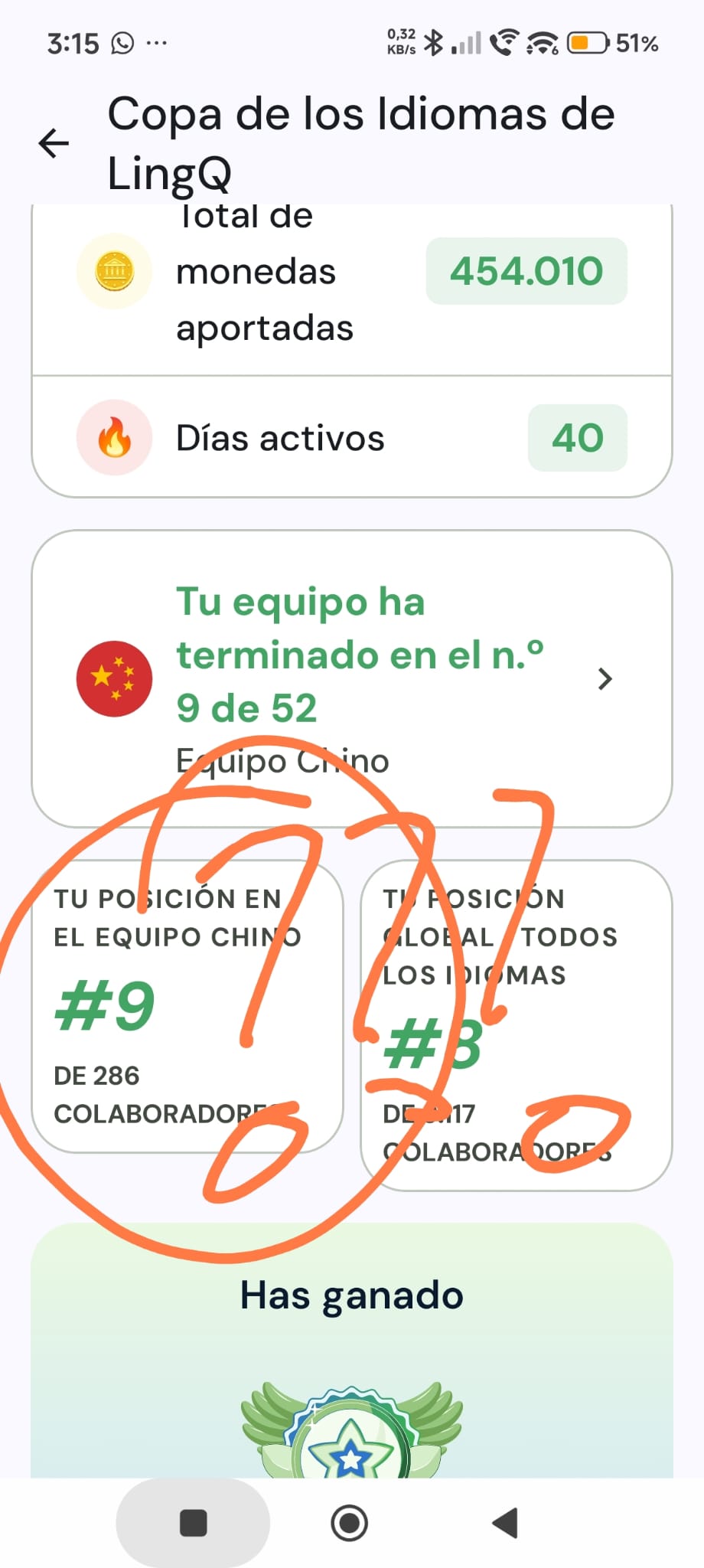
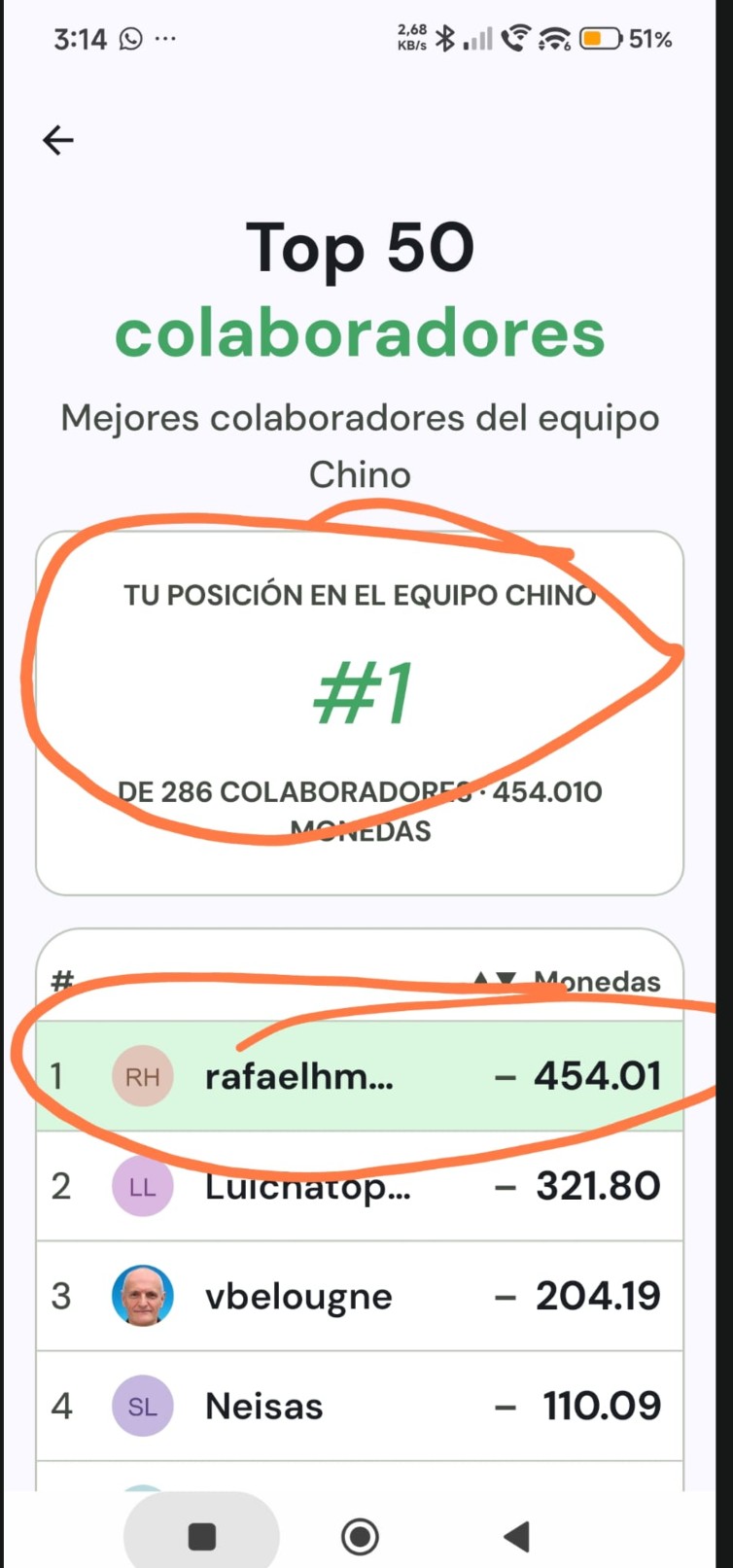
I’m a bit confused about the rankings, and I was hoping you could clarify something.
When I go into the Chinese team, it says I’m #1. However, elsewhere it says I finished #9 in the Chinese team, and it even says my position is #9out of 286 contributors.
So I’m seeing two different rankings for what seems to be the same team. Could you explain why one place says I’m #1 while another says I finished #9?
It took a lot of effort to get there, so I’d really like to understand which ranking is the correct one.