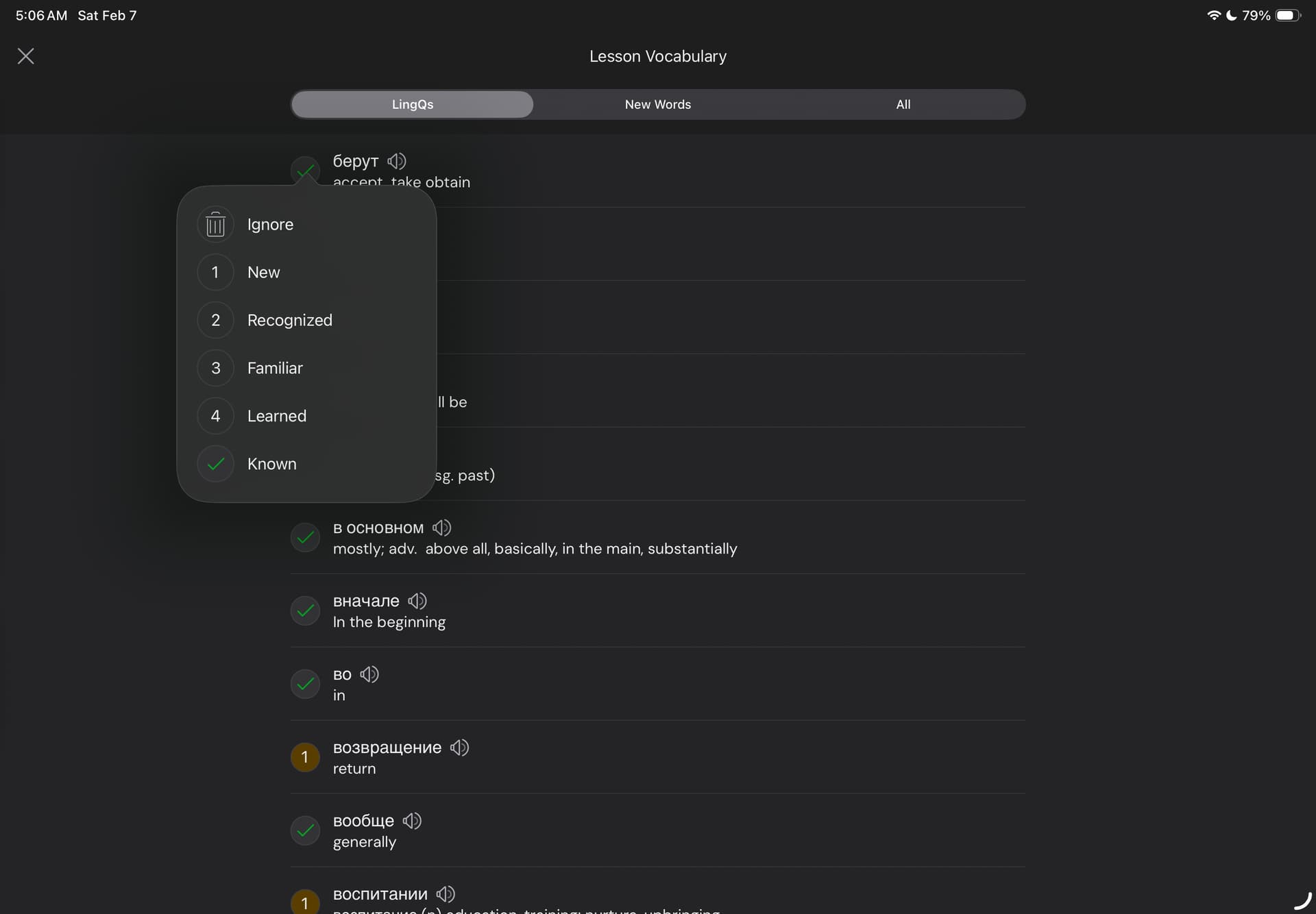
This previously was a very reliable list from what I recall, but now
LingQ v6.0.1(1), consistently lists known words along with lingqs.
Thanks, we will have it fixed.
Hi @vernmartin ! Thank you for sharing your feedback!
The behaviour you noticed is the result of an intended change. We’ve updated the LingQs tab in the iOS app to display LingQs with all levels up to Known, to bring it in line with how it works on our other platforms (Web and Android).
We’re sorry for any confusion this change may have caused. If you have any suggestions on how this could work better for you, we’d be happy to hear them.
You mean up to and including known? None of the known words in the list are lingqd - and there is a tab for both. If I wanted to see all, I’d look at the all tab. I want to review either new or lingqd. Used to me able to.
My first suggestion is to explain why you think it’s an advantage to add known words to a list of the words and phrases I have “lingqed.” We already have the “All” tab which, coincidentally, lists all words in the lesson. We also have “New Words” list. It makes sense that under the “LingQs” tab you filter for all words and phrases that are currently lingqed. Great place to review such words all at once. If anything, add a new tab for “Known” words.
The bottom line: why confuse the issue and add words I learned somewhere in my three years of using Lingq?
Well, I have a few issues with the last iOS update.
When I finish a lesson, before there was an option to select and delete all singular blue words that turned as known. I usually do that at the end of the lesson and don’t bother clicking on every blue word when reading. Now that option is gone. I have to click on those words that become lingqs, that go to the next page with all lingqs and click on them again, then click on delete on the opening window. Before it was much better and faster.
When I import a lesson, like an article, the lesson doesn’t automatically open straight away like before but I have to click on imported lessons to find it.
After importing a lesson, I open the lesson, I click to get the audio, I click to listen to the generated audio but the menu bar at the bottom doesn’t show up to pause the audio. Before it was doing it only on the first page, now it’s doing it in all pages. I need to close the lesson and open it again to make the menu bar at the bottom appear.
@davideroccato Thanks, we will look into this.
@vernmartin Thank you for bringing this to our attention. We really appreciate your involvement and thoughtful feedback.
The initial idea was to make it consistent with the Web app, where all LingQs (i.e., words/phrases with an assigned meaning) are listed under the LingQs tab. In other words, this tab currently shows all words/phrases with a meaning assigned, from status 1 to Known.
We’ll take your feedback into account as we continue improving the app in future releases.
@davideroccato Thank you as well for bringing these issues to our attention - we truly appreciate you taking the time to report them.
We’re already working on fixing the 3rd issue. It’s a known bug, and it should be fixed soon.
Regarding the 1st point, thank you for the feedback - we’ll definitely take it into account.
As for the 2nd issue - I have not been able to reproduce it on my end so far. Could you please provide a bit more detail about the steps you’re taking, the mobile browser you’re using and a sample link to the article?
@Denys_B I appreciate you’re trying to fix those issues. I hope you’ll achieve that soon.
Regarding the 2nd issue - it seems now it’s working like it was working before. I use Safari and I import every day at least a new article. But in the last few days it went back to normal, the articles open straight away, and I haven’t changed anything. I’ll update you again with more info if it starts not working again, and I’ll add more info.
@davideroccato Thanks for the update!
No one ever explained why this change was intended, and it also introduces a bug in the Lingq count. At the end of a lesson I noted that the iOS app claims “4 LingQs Created.” The truth is that the Russian letter «В» was a LingQ and is now marked “known.” So it is not a LingQ and should not be counted in this list.
So not only has no one explained why this is “as intended,” but it messes with the LingQ count.
@vernmartin As Denys explained above, you see on the list all LingQs with all statuses. Including LingQs with status 4 (learned) or Known (checkmarked).
That’s how it always worked on web and Android and this change was made on iOS to keep consistance across platforms.
This is finally working in a manner that makes sense: as I move through the linked vocabulary and mark some words known, it shows a green check mark. If I come back to the list later, that’s gone. Makes sense. Nice to know I can reverse any accidentally marked as know words.
Good work!