Does the existing reader not do this? You don’t have to have the sidebar open, and the new micro pop-up is so minimalist and in the flow. I find it a great way, the best we’ve ever had.
You have your text with no extra stuff, and if you need to tap on a word, you do. The meaning is right there above the word. If you need to delve deeper, you tap to expand it, then close the pop-up and go on reading.
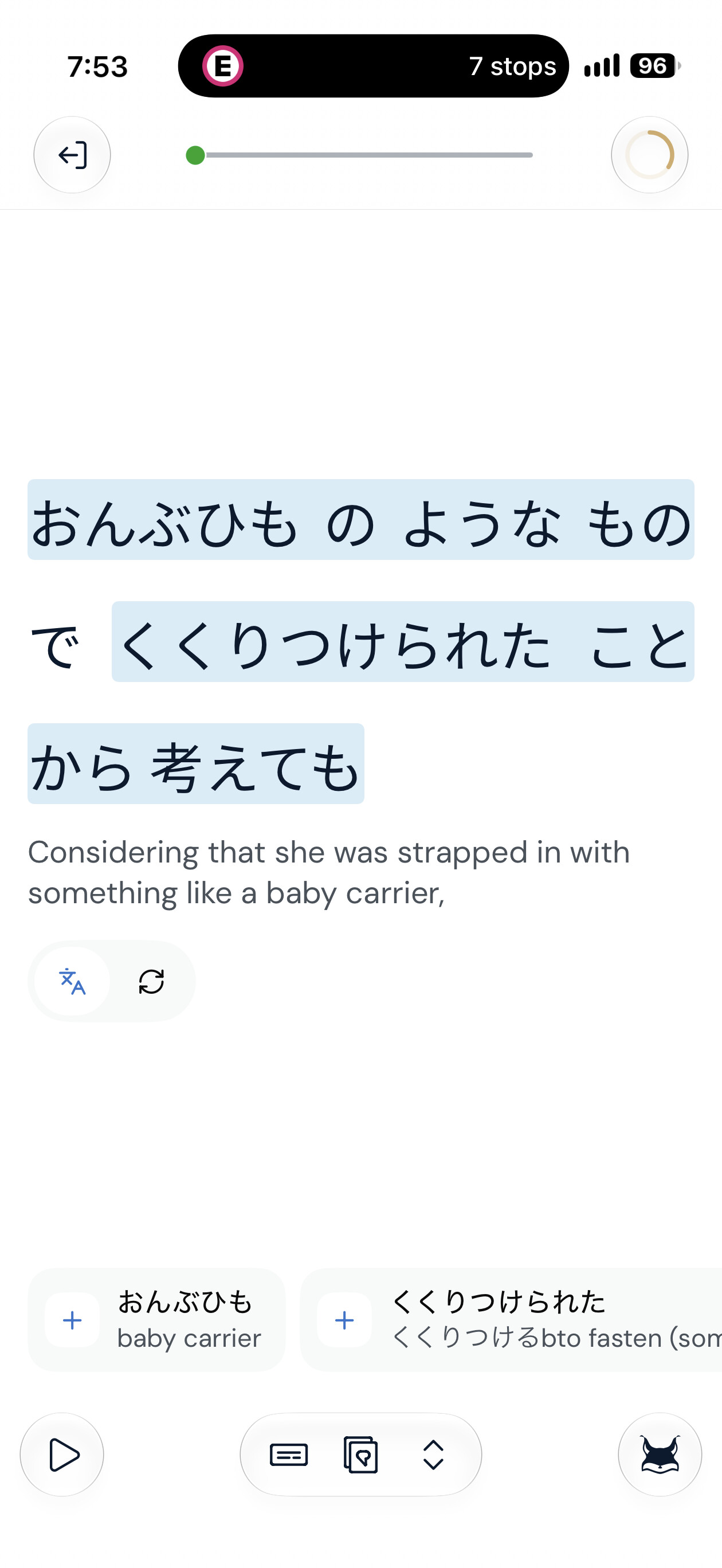
Here is a link of a new lesson, i checked the web reader and see the same issue: [1巻] 本好きの下剋上.03 For example whole sentence highlighted as one item. And i would need to understand where each word is, as translation is not accurate sometimes. I see the logic of the phrases, but in case of this lesson from audiobook, a lot of phrases selected are quite unique, so if i add it as linq, i will probably never see it again, so it defeats a purpose of saving phrases, better just save it as separate words.
This sentence should have a breakdown like this:
おんぶひも (おんぶ紐 / Onbuhimo): A traditional Japanese baby carrier harness or strap (onbu = carrying on the back; himo = cord/strap).
ような (You na): “Like” or “similar to” (used to modify a noun).
もの (Mono): “Thing” or “object.”
で (De): Means/instrument particle (“with,” “by means of”).
くくりつけられた (Kukuritsukerareta): Passive past-tense form of くくりつける (kukuritsukeru), meaning “to tie tightly,” “to strap down,” or “to bind to something.”
ことから (Koto kara): “From the fact that…” or " judging by…"
考えても (Kangaetemo): “Even considering,” “even thinking about,” or “even taking into account.”
Regarding the horizontal list - clicking on the word shows a pop up, which blocks text. And if I’m following audio, i want to see a full text and just click unknown words below without breaking reading with audio.
Ahh..this looks like you’re on the web app, which confused me a bit. This is the iOS beta feedback forum. At any rate, not a problem, thanks for pointing this out.
Those are suggested phrases, so if you click again, you can see the separate words contained within them and create LingQs or whatever you want to do. I can definitely see some bugs here, both in terms of the types of phrases that are being suggested in Japanese and the fact that they don’t disappear once you ignore them. This is functionality we are working on. We are also going to introduce a control to hide suggested phrases if you don’t find them useful.
I must say, I have been studying Italian with these, and I find them extremely useful. The phrases suggested in Italian are actually useful phrases that can be found elsewhere, and the functionality on the Android and iOS apps with regard to ignoring phrases is a lot smoother than this. We have some work to do here on the web. Thanks again for pointing that out.
Yes, but from user experience it is 2 additional clicks per sentence, total 4 for this sentence. Which is also breaks reading flow. Would be good to add option to turn off suggestion of phrases.
I was listening to a video today in scroll mode. I was unable to stop the video using the button at the bottom. I had to use the button on the small video window top left.
I found on many occasions when pressing the start/stop button at the bottom that I pressed instead on the location slider and moved the video to a totally different position.