Nice! I guess the only issue is that LR is limited to Netflix and YT, whereas I can use asbplayer anywhere. For Netflix specifically though it’s quite nice, so I might end up using it for that. Thanks 
Good question! The iOS app has two core features - an ereader and an extension for Safari (exactly the same as the Chrome/Firefox one).
I built it because I wanted to read Wikipedia on my phone in my TL and take my books offline (while camping in the boonies without reception) and still have dictionaries, translations, spoken words, etc. You can do the latter if you cache/download your books in the LingQ app but that didn’t always work well for me.
The Chrome/Firefox extension isn’t going anywhere. It’s the same code as the Safari one - so anything I fix or add in one shows up in the other. It runs on LingQ’s API anyway - so charging for it would be silly.
And yep - you understood right about the words. It syncs with your LingQ vocab if you use LingQ but you can also export your words and keep them locally in the app without an account. Personally I just like knowing my word list isn’t stuck in one place (and LingQ does a great job of letting you take your words with you).
3 Likes
Gave it another try. The Japanese parsing is much better.
1 Like

I haven’t had the time to activate it and try it yet, but this window keeps opening all the time even if the Web Reader is set to OFF.
If I click the Settings below nothing happens.
I think that pops up if there has been an update since the last time you opened the browser, at least that seems to be the case in my experience.
That menu is the settings page, you won’t see all the settings until after you’ve connected your API key.
This is really turning out to be such an amazing companion to LingQ, I highly recommend it!
1 Like
Thanks to those of you giving me such great feedback and letting me know about the issues you’ve run into!
Here are the latest changes since my last post (expected to go live in the next few days). I don’t really have anything exciting planned besides bug fixes and maybe some quality of life changes - however I’m open to suggestions so just let me know.
Features
- Added a feature to mark all words on the page as known (off by default; enable it in the settings page to see it in the dropdown) (v1.15.0).
- Added a setting to open dictionary links in a popup instead of a new tab. Popup is the default (v1.13.0).
- Added auto pause when a translation popup is used on video captions. On by default (v1.12.0).
- Added auto rewind when a translation popup on video captions is closed. Off by default (v1.12.0).
- Added the ability to customize the popup and highlighting colors and transparency (v1.11.0).
- The dictionary window reopens where you last left it and at the size you chose (Chrome) (v1.4.0).
Changes
- LingQ’s own website (lingq.com) is now off by default in “Off on this site” (v1.16.0).
- Translation edits now save when you close the word popup, not only when you press a level button. This applies to words already in your vocabulary; tapping a new word and closing still adds nothing (v1.13.2).
- The dictionary popup is slightly larger and remembers its size when you resize it (v1.13.1).
- The API onboarding page no longer opens automatically on new version releases (v1.14.2) @davideroccato (didn’t know I could turn this off - thanks for the nudge!)
Bugs
- Fixed translations saved by vocabulary sync or import using English instead of your translation language (v1.14.1).
- Fixed the language dropdown being hard to read in dark mode (v1.13.0).
Languages
- Persian words written with a zero-width non-joiner now highlight and match the same word typed without one (v1.16.1).
- Invisible formatting characters (soft hyphens, bidi marks, Hindi joiners) no longer make a word look unknown (v1.16.1).
- Fixed translations not appearing when your translation language is Chinese (Simplified or Traditional), Croatian, or Serbian (v1.14.1).
4 Likes
unfortunately the doubling up problem with Arabic vocab still persists. Totally understand if this isn’t a high priority fix for you so please do not feel stressed to try and fix it if it’s too much of a pain.
It’s strange as it doesn’t seem to happen with other languages I have tried. And it’s definitely nothing to dio with accent markers or anything as you can see from the images the words are one for one identical.
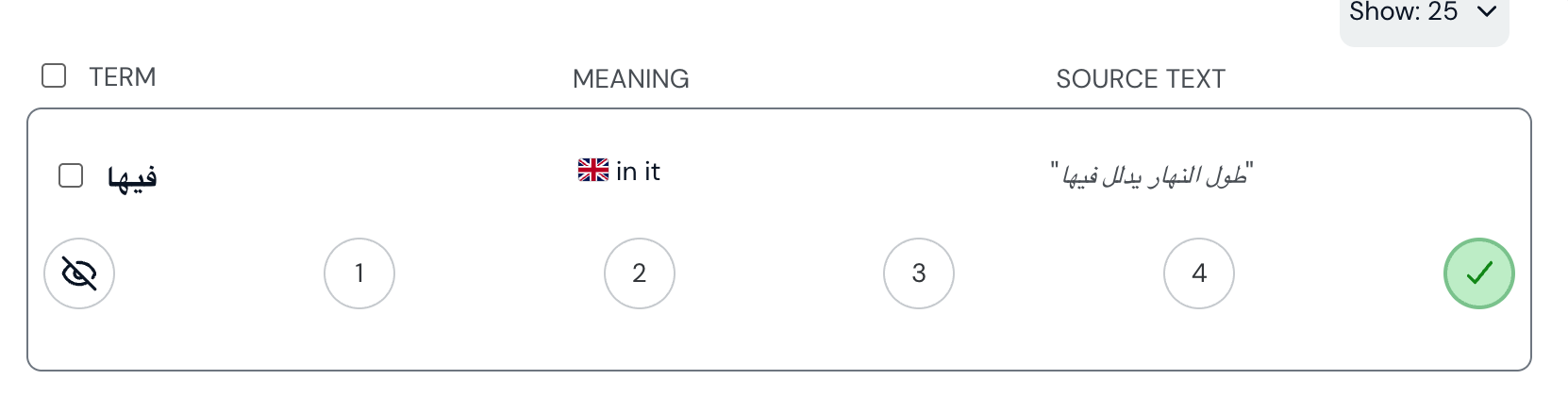

Thanks for letting me know Josh! Let me look into it and get it fixed!
1 Like
Hey @joshmassarotti , I found the issue and pushed a fix (it should be live on the Chrome shortly). Root cause was the vowel marks for Arabic (also impacted Hebrew) - you’ll need to manually delete any duplicates from your vocabulary.
Let me know if you still have issues after this!
thank you i will try it out!
This is probably not relevant, but if words are different internally because one uses precomposed letters and one uses composing accents, for example, these are differences that will not be visible in displayed text.
Just installed it, it’s a great extension! I’m using it for Japanese, so it’s a little annoying that it turns all English words blue too, but I just keep it OFF and only turn it ON when I’m on a Japanese page, so it works fine. I wish LingQ would build a native version! Though this one works well too.