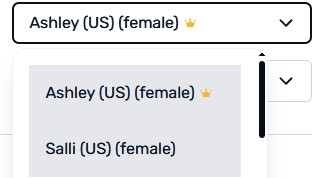
Perhaps the biggest is the introduction of our new Plus tier with advanced AI chat modes and AI voices from 11 Labs, and higher volume transcription limits.
Premium was also enhanced with the addition of AI voices from InWorld. And, the new “Explain This” feature, which is available for both Plus and Premium tiers. This lets you ask Lynx AI for more information about a specific word or phrase you are looking at. Check it out in the Notes field in the LingQ widget.
Here is the full list of updates:
New Plus tier includes 11 Labs voices, Lesson simplification, high volume transcription and advanced AI chat modes.
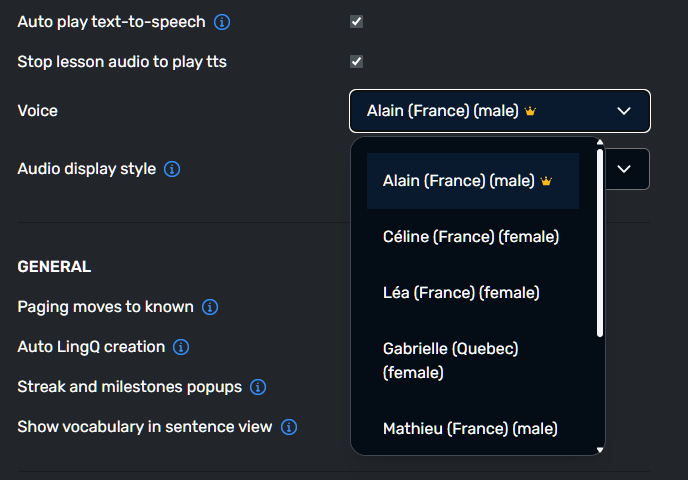
New Inworld AI voices for Premium users
Grandfathered simplification for Premium users
Explain This for Plus and Premium
Setting to disable tags, disable auto tags
Updated home page and public pages on (web)
d shortcut to check dictionary for phrases (web)
Allow free playback of Youtube videos beyond timestamp boundaries (web)
As a librarian who has also made some great courses available to all users, I expect that you consider some benefits for those of us who voluntarily help improve LingQ.
Perhaps one benefit could be access to the advanced version of Lynx.
By the way, I sent you an email a few days ago regarding collaboration, but I haven’t received a reply yet.
Where are these advancements? I can’t find them.
New Inworld AI voices for Premium users
d shortcut to check dictionary for phrases (web)
Grandfathered simplification for Premium users
@len1984 I think the InWorld Ai voice is the one with the crown? It seem to generate better audio.. at least it no longer pauses at dash in words like grand-mère or Y a-t-il
@mark I’ve subscribed to Plus since the beginning and the AI voices have never worked. Kian (Persian) and Einar (Icelandic) don’t work at all - not even for a single word. This has been a scam from the beginning as I’ve indicated before. Why won’t you refund our Plus amounts until this actually works?
yea, overall sound better, but occasionally sounds like a drunkard… extended the last syllable of some words for way tooooooooo longgggggggg usually at end of a sentence or commaaaaaaaaaaa.
@kurdavar.h We do appreciate the things you and the rest of our librarian volunteers do for our community! At the moment Plus functionality is not one of the ways in which we show our appreciation. That could change in the future but, at the moment that is not the case. As for any emails, I have received none from you. You can try posting on my wall here if trying to get in touch with me directly.
@sma_grodorna It can be frustrating when things don’t work perfectly. I feel the same way when using these voices. And, keep in mind that some voices are going to be better than others. Those languages you mention being less popular are probably not going to be as good as those for more popular languages. We are at the mercy of 11 Labs and how quickly they improve their service. If it doesn’t work for you, you can make the decision to downgrade. As for the cost, you pay us, we pay them so a refund isn’t possible. Having said that, the voice quality is high and much better than standard, but there are some pronunciation mistakes. It should get better over time but, in general, it’s a significant upgrade. It’s up to you if the tradeoff is worth it. If not, you can downgrade and wait for things to continue to improve. We don’t have any control over the performance although we are working with them to help improve.
@len1984 You can change your TTS voice in the reader settings. You can see Ai voices identified by their tier icons. InWorld voices show the Premium crown. The keyboard shortcuts work in the Reader. This update means that hitting d when you are on a blue word will open the widget and check the default dictionary and centre your cursor in the meaning field. Make sure any popup blockers are off. The simplification option is available in the lesson menu in the reader.
@mark When I select Alain, the new Inworld French voice, its voice is not playing. Instead another, less advanced voice plays. Can you, please, check it?
@Zolka The Alain voice, while more realistic than the less advanced ones, struggles to reliably produce word/phrase level audio. For that reason we revert to an older model for playing audio when you select a word/group of words, but we still use Alain when generating sentence or full lesson audio.
Ultimately most of the benefit of the more advanced voices comes from hearing them for longer chunks of audio, as they have a more realistic cadence as they move from word to word.
@mark I think you are misunderstanding me. The issue isn’t that the Persian and Icelandic AI voices “don’t work perfectly”—the issue is they don’t work at all. As in if you press on a word, play a sentence or try to generate audio, nothing at all comes out. I am saying I signed up for Plus two months ago, have been patiently waiting and it has never worked, at least on iOS. That is why I have been calling this a scam asking for a refund for two months. Have you even checked the two voices I referenced?
@nsprung@mark Yes, this problem also occurs on the English web version, where the two sounds are the same. However, there is no such problem on the iOS client.
@len1984 We will shortly have an update so that the functionality I mentioned will be equally available on all platforms, you won’t see any more differences.