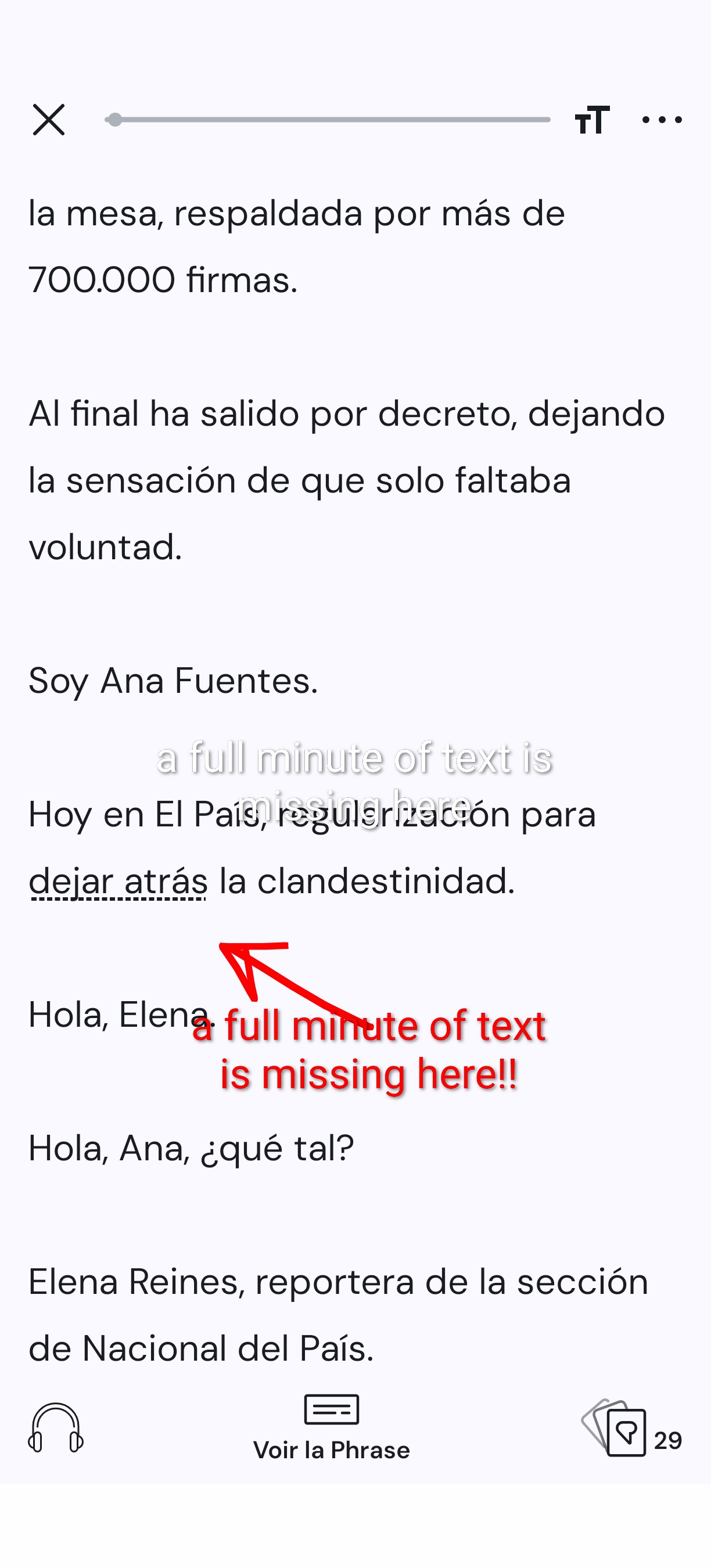
I imported a podcast’s MP3 file (see source and file below)
but the audio transcription omits a full minute of text at the 59 second mark.
I didn’t go further, so it’s possible it occurs more than once with this file.
When playing the audio, the audio-text synchronization is wrong of course.
You can witness the problem by playing the audio with the embedded player below and reading the text in the screenshot below.
@alainravet1 If the MP3 is incorrectly encoded, our importer is treating part of the frame as silence. Firefox browser is less tolerant of that. Re-converting the file to MP3 with a different bitrate (256-320 should do the job) or converting to M4A should resolve the issue. You can convert with this online tool: https://online-audio-converter.com/
@zoran
Thanks for the workaround; it fixed my problem in this case. It’s a bummer though that I need to manually check that it didn’t occur after each import.
It shouldn’t be a problem though; seems to me your importer is a bit brittle as I’m the second person to report such an issue in 10 days.
If simply upscaling the bitrate when it’s too low fixes the problem, you could consider automating this step by adding it to your import pipeline.
For the record, this happened again with today’s edition of the El País podcast.
This is a talk show where they sometimes receive speakers who mumble and/or have a thick accent.
While I understand it can make transcribing some chunks of audio difficult, if not impossible, it doesn’t justify messing up the audio-text synchronization once the audio gets clearer. It’s a transcriber bug.