When I look at the challenges, in all three challenges that I joined, that started on November 1st, the ranking member list shows the same members.
1 Like
Look at the Lesson settings. Far down there are the settings for sentence-mode.
Please consider a second swipe option for the Vocabulary flascard review: I would prefer swiping up for “right” and down for “wrong”.
(I’m mixing up wrong and right for weeks now. I just can’t get used to it. I use another flashcard app almost daily for 13 years now, where the swipes go in the opposite direction, and it seems like these swipe movements are ingrained now.  )
1 Like
And please bring back the play button, the 5-second rewind button, and the translation options button—which lets you toggle between the original phrase and its translation—when in phrase mode.
Is this possible as an Android widget? How often would it update?
Thank you for fixing them!
I’ve noticed two more things about the review mode, but for these I don’t know if they are bugs or design decisions. Anyway…
- In cloze tests the sentence is read by default, which is great, but it’s a full sentence. So the missing word is also read aloud, which makes the test question trivial. It should be either skipped/muffled (if that’s possible) or read only on demand.
- The review does not include words at stage 4. It’s actually the same behavior as in the web version, but to be honest, I preferred the app’s handling of review with all the words. It allowed to avoid extra actions to deal with stage 4. It also make sense to include them since “stage 4” is explicitly selected in the filter settings.
By the way, it would be really great if the review filter settings are saved and then automatically applied for each new session.
1 Like
For videos in fullscreen mode it’s impossible to pause/unpause playback for me. I have to exit fullscreen mode first and only then can I access video controls like pausing or disabling subtitles.
Please send a screenshot of your fullscreen mode. Controls should be to the right of your screen, and pausing/playing is on the YouTube video itself that you can always tap on.
Is it possible to view in page mode but allow the audio to continue to play as normal? Now by moving pages the audio skips to the top of the page. So when i turn a page i need to do it as soon as the audio finishes or it feels like it skips a beat? If i go back to the last page, just to check something, the audio is interrupted and starts playing at the top of that page. It’s very annoying. I’ve looked in my settings but can’t figure out how to allow the audio to just freeplay like before.
2 Likes
It only has LingQ controls. Tapping on the screen doesn’t change anything. I can trigger regular YouTube controls to appear by interacting with the bottommost element e.g. tapping on a lingq, they become visible for a second or two but tapping on them does nothing.
In scroll mode, the speed is hidden a few clicks in. Please put it on the main bar. The speed sticks across different languages. If I can hear French at normal speed, it doesn’t mean Greek is as easy. I end up changing ot constantly which is a pain as it isn’t on the main bar and has no shortcuts.
The version where you can choose the speed in two clicks (menu and choice) is better than cycling through 2, 1.5, 1.1 etc.
Recent version: At the end of a lesson, we used to be able to tell which “chapter” we were on ,e.g 5 of 20. That’s gone. Could it be reinstated?
On the bottom, when you tap the up-down arrow you can see the lesson name.
[Edit: on a tablet]
But you can’t see the part your’e on (e.g., if a book is split into 20 parts).
Oh, on my tablet that part is visible.
1 Like
[Tablet and phone]
-
In the vocab Review (on the homepage):
My settings make me see the status bar only on the back side. That setting unfortunately made the main text (term and everything that comes with it) jump up and down with each card turn. -
In Reader, Page Mode: The lesson audio always stops at the end of a page. After turning the page I need to tap “play” again. Is that wanted? [Edit: that point is solved. I need to enable auto-advance to continue the audio.]
-
EDIT: in Reader, Page Mode: When I exit a lesson, while the lesson audio is playing, the audio continues to play. I still hear the audio while I write this post in the Forum.
1 Like
The speed in scroll mode keeps going back to 1 (unhelpful). I use several devices.
Please add blue words to level 1 as I read, not connected to a lesson. I don’t want to click anything at the end of a lesson. That caused trouble traditionally.
The end of lesson button is pointless. Please add blue words to know and move me to the next lesson without any clicking. One max.
1 Like
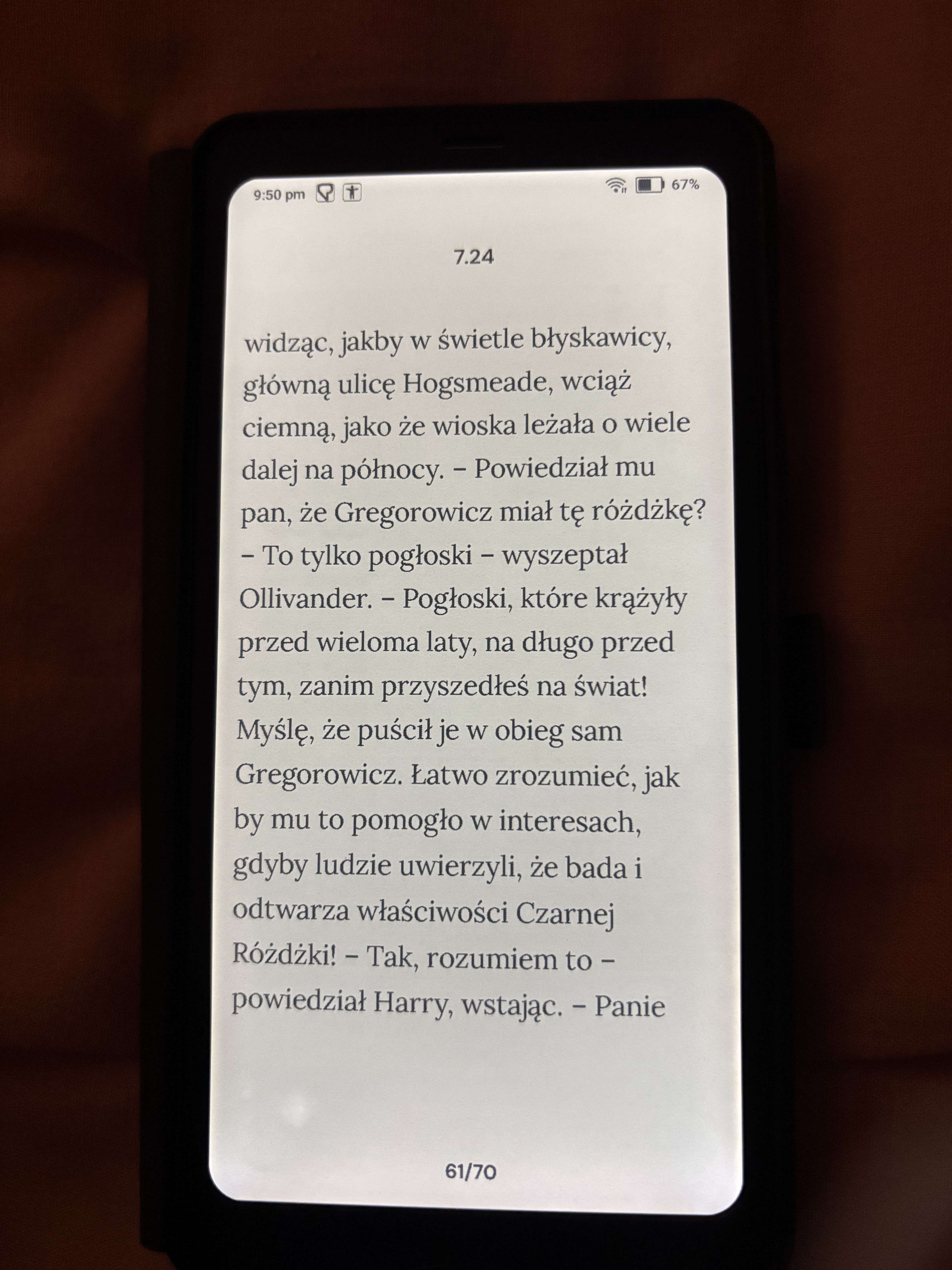
I use a Boox Palma and really appreciate the e-reader toggle and volume-button page turning. Game changer! I also really like that we can have a simplified view by removing the progress bar and settings to give a clear, simple reading experience.
Suggestion: in that full page view could you fit more lines per page? You can seen from the photo there is quite a bit of unused space. Ideally I’d like an option where almost the full screen is text, in that case I’d drop the chapter title to optimise space (but keep the page numbers at bottom).
1 Like
The new app has the speed button on the bottom of scroll moode. And it has a two click method. Fabulous. Thanks .
I recommended Ling to someone today. He wants to learn Mandarin and Spanish. Samoan, Mongolian and I think Croatian too.
1 Like