Aminte: the LingQ to Anki workflow I'd wished existed

This all started when I noticed words I studied in Anki stuck far better than the ones I casually read in LingQ, especially rarer vocabulary. But I could never justify the amount of time I was spending making the cards. Reading is the part I actually enjoy, and every minute spent manually copying sentences into Anki was a minute not reading.

I tried LingQ’s native flashcard export. But getting the cards across to Anki was cumbersome enough where it couldn’t become a habit. When I did sit down to review them, the sentences had come through truncated, usually starting mid-thought, where the part that mattered most was missing. So there I’d be, blanking on a word I could’ve deduced if I just had a little more context. That was a particular kind of demoralizing. It stops feeling like you’re learning the word and starts feeling like evidence you never knew it.

The way I’d been thinking about it is that LingQ hands me content I’ve chosen, and actually want to read, and Anki is what makes words stick. Nothing sat in the middle… until now:

So I built Aminte. The name comes from the Romanian phrase “a-și aduce aminte” - “to bring to mind”. In practice it’s one, maybe two, click(s): click the extension while in a lesson, and send. The cards are in Anki before you’ve closed the tab.

showcase
*full demo here: https://www.youtube.com/watch?v=vw9wffsY0qo

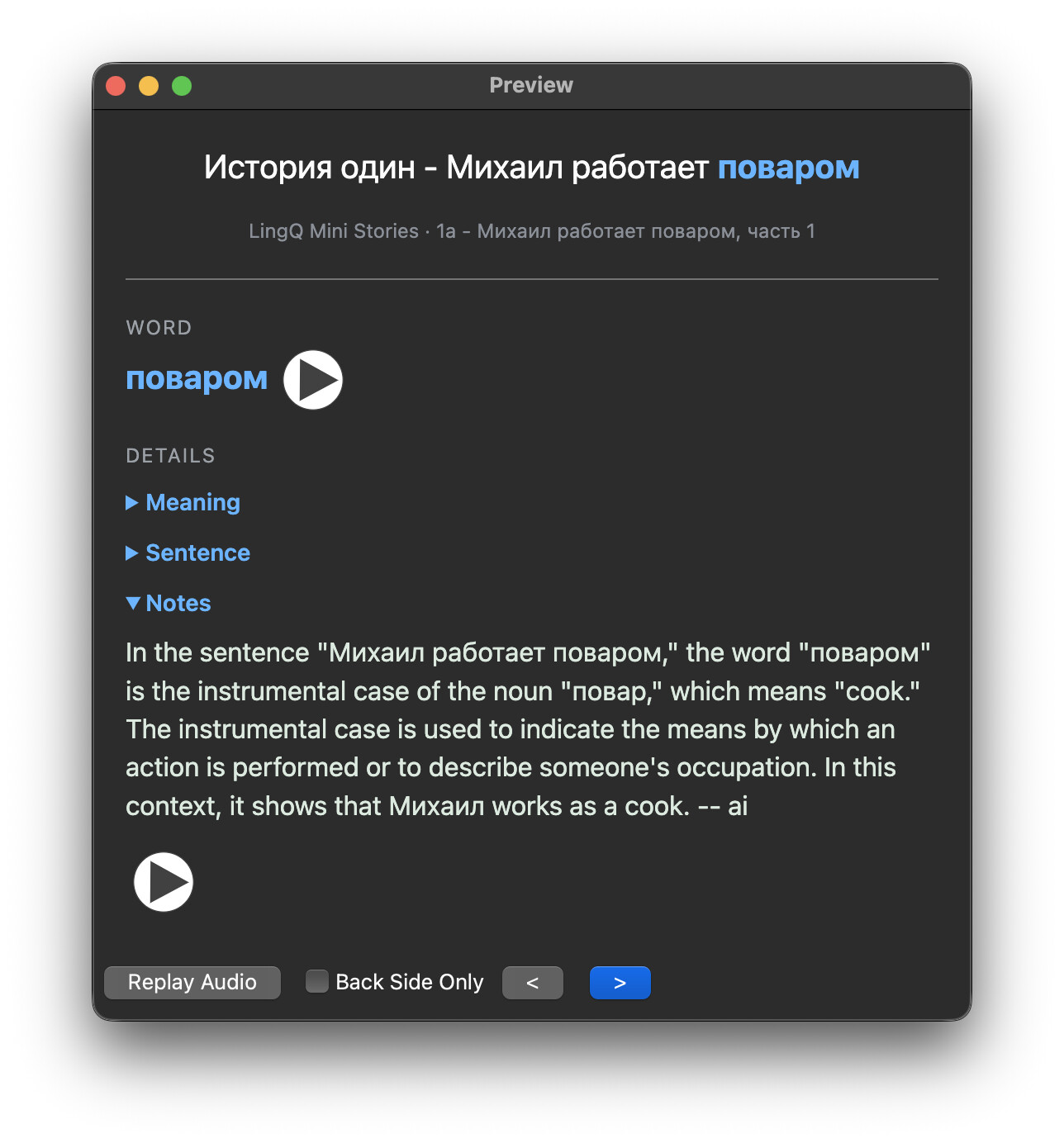
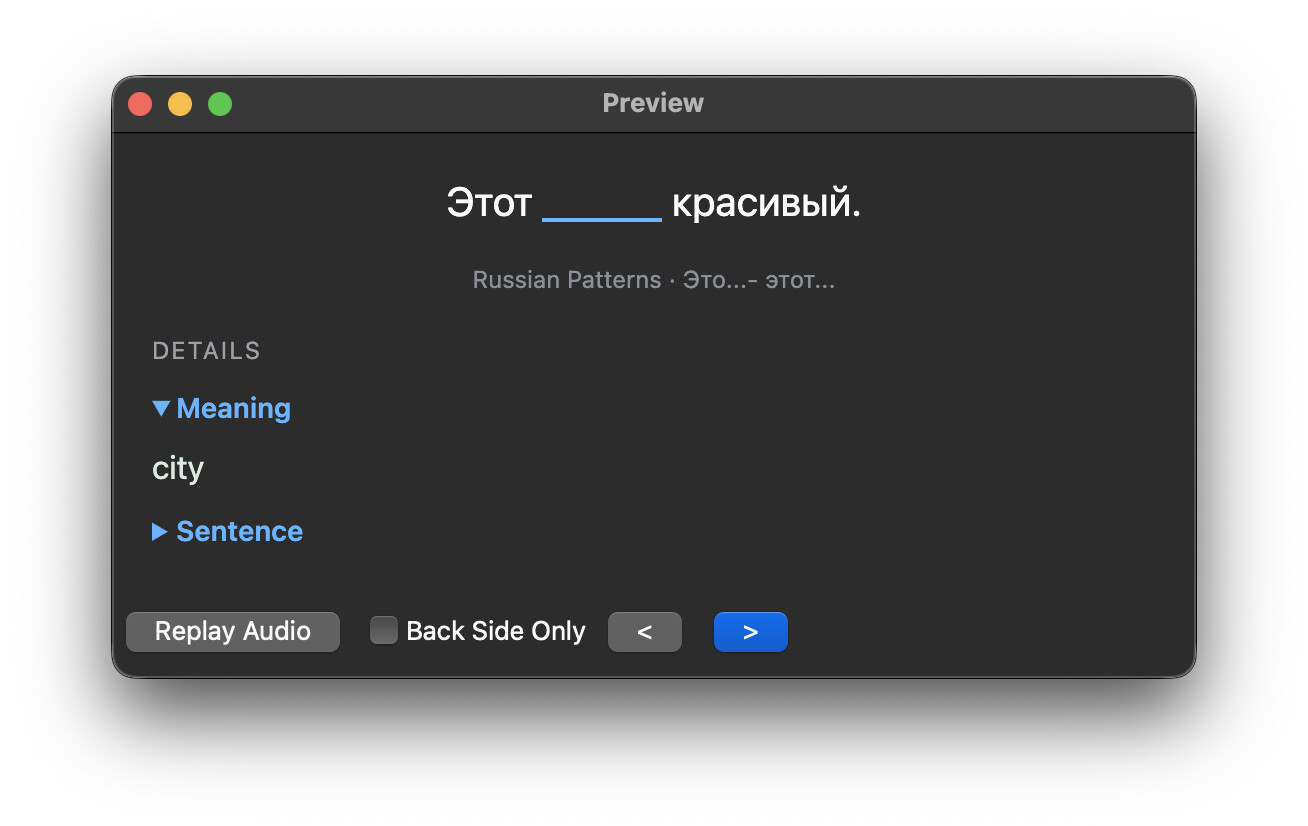
Every selected LingQ level in that lesson becomes a Cloze card. The word is blanked out of the sentence, sized to the word so two similar sentences don’t look identical (often the case with clozed pronouns). Underneath sits the course and lesson it came from. The back has the word, your saved meanings exactly as you saved/wrote them, and LingQ’s translation of the sentence, both collapsed by default unless you need feedback.
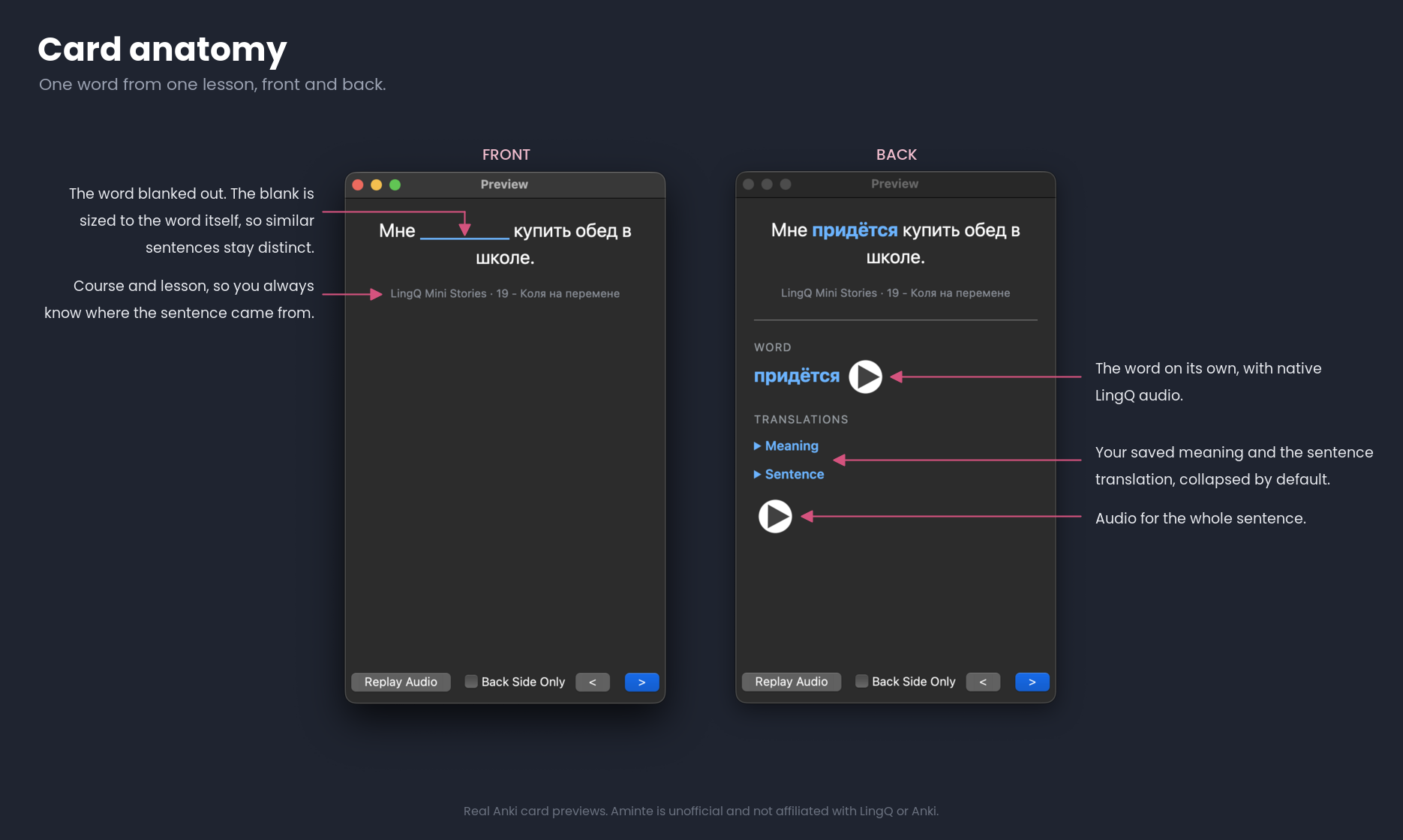
By design, there’s one card per word and sentence rather than one per word. If you meet the same word again in another lesson, you get a new card instead of it overwriting the first, so you end up studying words in many different contexts. Through reading, words naturally graduate in level, and less cards are created over time as more words become known.

The rest is options:

  • How much context each card carries (one sentence by default, and up to five).
  • Which LingQ levels become cards. It defaults to 1 to 3, since including everything tends to produce more cards than anyone can realistically review.
  • Which deck they land in. It uses the course name by default, and if you rename it that sticks for the whole course.
  • Tags, which default to the language code and are added rather than replaced, so anything you tagged by hand in Anki survives.
  • Re-sending a lesson updates existing cards in place instead of duplicating them, so your review history is never lost.
  • Native LingQ audio on the word, the sentence, or both.

All you need is Anki on desktop, with the free AnkiConnect add-on installed, and to be logged into LingQ in the same browser. There’s no account and nothing else to configure. This extension was built with privacy and simplicity at the forefront of its design.

This extension is free. The one paid feature is the audio, at $10 with 150 free clips so you can try it on your own lessons first. It’s there to fund ongoing development, and everything else above works without it. You pay once and it’s yours, every future version included. I have enough subscriptions, and I’m sure you do too.

Please note this is unofficial. I’m not affiliated with LingQ and this isn’t endorsed by them. It works through one’s own logged-in session against LingQ’s own API, which also means that if their internals change it may break until I push an update.

I’ve tested it end to end on nine languages, but I’m one person and my own reading is mostly Russian right now, so I’d really like to hear from people using anything else, particularly Japanese, Chinese and Thai, where word segmentation gets interesting.

I greatly look forward to seeing the community benefit from this as I have. I always welcome any feedback and feature requests.

Download: https://chromewebstore.google.com/detail/aminte/lhejbifkielekmlbibjapplojjiboahe

11 Likes

Congrats on your release!

It is nice to see more products being built off the LingQ API. I hope someday they will release updated documentation and guidelines for fair use.

A question I have is about bi-directional syncing back from Anki to LingQ after the cards have been reviewed. Is this currently operational? It seems like the user would need to manually update the LingQ progress later.

I’m an unfamiliar with the inner workings of Anki but there is an endpoint to batch update LingQ card statuses with a list of IDs. You can find it by playing around in the vocabulary tab.

A cool addition would be to maintain the native lesson audio with the word. The process of chopping the lesson audio can be done with packages within an extension context but can slow down the browser. Offloading that process to your own server with FFMPEG could be a good idea for your paid package.

Tried it out and seems pretty solid, although I would like the option to have the english prompt on the front of the card for the cloze. apart from that it’s really sick.

I really appreciate the feedback.

On syncing back to LingQ: this is deliberate, and it likely won’t change. Aminte is strictly one-way: it reads your LingQs and never writes anything to your LingQ account. That’s a safety consideration, not a missing feature; Anki’s intervals don’t map cleanly onto LingQ’s five levels, any mapping would be arbitrary, and I don’t want a bug (or a disagreement with my algorithm) silently rewriting anyone’s LingQ history. LingQ stays the source of truth. If Anki helps a word stick, you’ll mark it Known the same place you always did: while reading.

On chopping native lesson audio: I looked into this, and it’s a no right now for two reasons: Running lesson audio through my own servers would mean processing LingQ’s licensed content on my infrastructure, which isn’t mine to do, and it would break the extension’s core privacy promise (everything runs locally, no servers of mine, no data collection). I’m not ruling out a fully client-side version someday but that leads into reason two: LingQ’s sentence auto-generated timestamps do not make it practical right now (especially with Whisper generated transcripts). They tend to not sync up with the sentence beginning to end, which is very noticeable in flash cards. In the meantime, the extension can attach LingQ’s native TTS for both the word and the full sentence context, which has been much more reliable for me.

Thanks! Glad it’s mostly working for you! Leaving the translation(s) off the front was actually deliberate: I followed Gabriel Wyner’s advice to keep native-language cues off your cards so recall comes from the target language itself. But I can see the case for making it optional, and I’d like to hear more about how it’d help you.

Two design questions for anyone who wants this: should the toggle change every existing card, or only cards sent after you flip it? And for LingQs with multiple saved meanings — show just the first, or all of them (which can run long)?

personally i would just like the option to see the word translation on front of card just as it is on the back. just a toggle as it already is

This looks very interesting and promising. I like the name of your project, and the way you presented it. Well done!

I was wondering:

  1. Is it on Chrome only? Because I usually use LingQ on Safari.
  2. Does it work well on monolingual studies too? I only use one language for reading and definitions, I don’t have translations.
  3. Are names of the courses and tags mandatory? I usually delete all lessons after I read them, so I won’t be interested in those connections, they’ll just clutter my ANKI.
  4. What about if we have multiple meanings for the same target word?
  5. What about if we also have written notes for the target word? Does it pull from the notes as well?

Thanks.

  1. Is it on Chrome only? Because I usually use LingQ on Safari.

It is Chrome only right now. Apple’s process for vetting extensions is much more costly and rigorous. If I see the demand is there, then I will definitely pursue that. For right now though, Chromium browsers make up ~90% of desktop market share, so I must cater to that (as unfortunate as that is to me). I also use Safari day-to-day, for reference.

  1. Does it work well on monolingual studies too? I only use one language for reading and definitions, I don’t have translations.

I don’t quite understand what you mean here, but I’ll try answering the best I can. This extension uses whatever “dictionary languages” (LingQ’s term) you have configured. For example, if I have Romanian configured as my “dictionary language” in my LingQ settings, then all of the translations on the back of the card will show up as Romanian — not English. If LingQ allows the dictionary language to be same as the target language, then I suppose you could achieve zero translations, if that’s what you’re looking for?

  1. Are names of the courses and tags mandatory? I usually delete all lessons after I read them, so I won’t be interested in those connections, they’ll just clutter my ANKI.

Yes, for now. But there is nothing prohibiting me from disabling this behavior. I will work on an option to disable all tags in the next release.

  1. What about if we have multiple meanings for the same target word?

Each meaning assigned to a LingQ is shown under the meaning tab, separated by semi-colons:

  1. What about if we also have written notes for the target word? Does it pull from the notes as well?

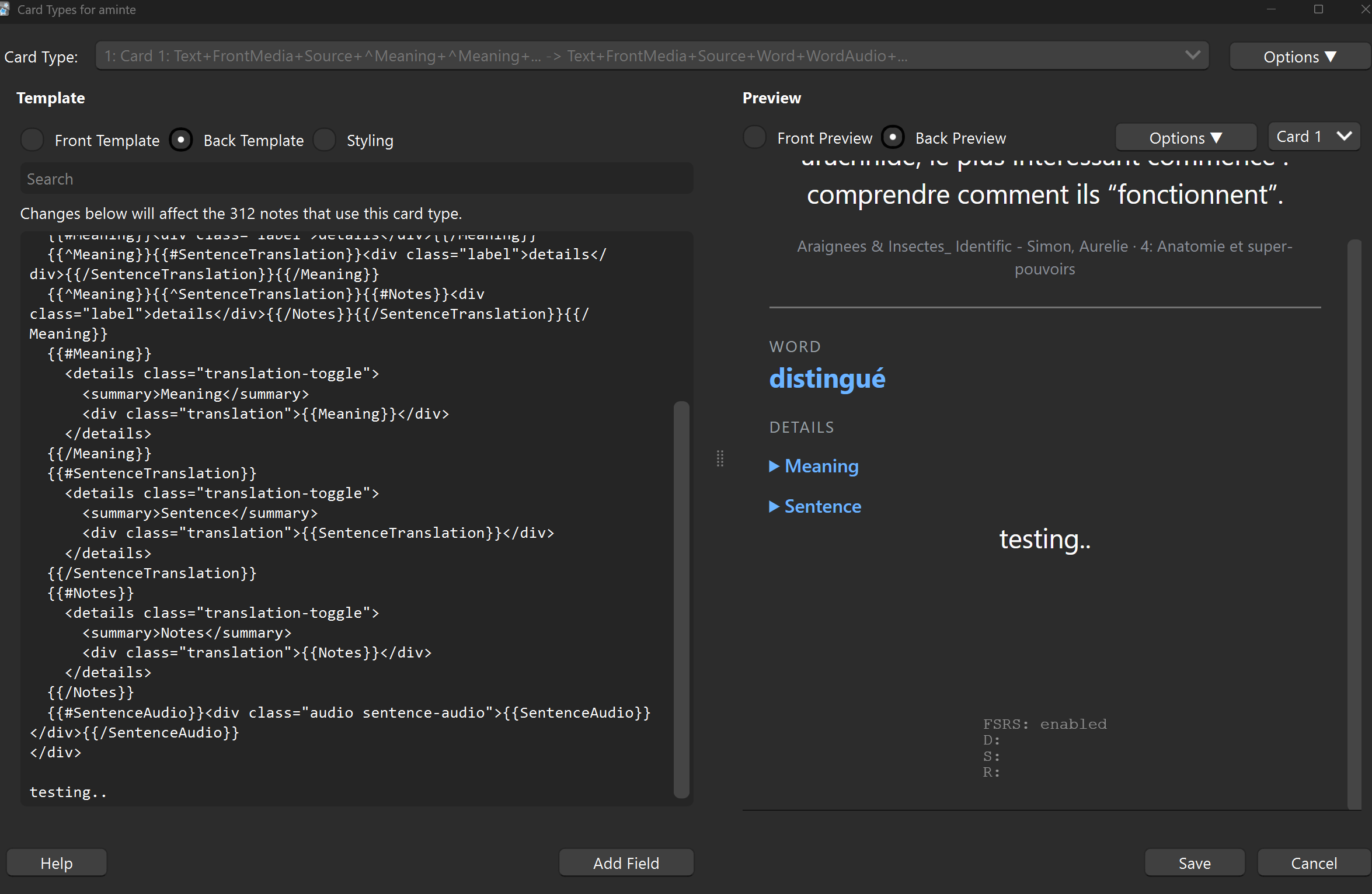
It does not pull from notes right now, but this would be a great feature, and simple to add. I would put it as a hidden item right under Sentence. What do you think about that?

Edit: Here is a proof of concept, I’d love to gather your thoughts.

This looks great! Not sure if it is possible, but the two features I wish the other lingQ to anki sync I’ve been using had are:

1a- If I change/update a meaning in lingq, it will be updated in Anki… I often add and/or remove things from the meaning on lingq, would be great if this chage could be reflected in Anki.

1b- And possibly the context? for instance some things are words but are in the wrong context, like a name or something that is actually a real word in the language. So when I see it in the right context, or a better context, I ignore the word and then re-lingq it with the new context. Would this update in anki?

2- The other thing would be to have an option to delete anki cards once they have been marked as known (5) in lingq.

Again not sure if these are even possible but if they are, it would be great for them to be added.

Great work! :slight_smile:

Do you mean re-syncing should update every existing card for that word/phrase? Personally I prefer the meaning on the back staying fixed to what it was at that time. “Read” is a good example — infinitive (“I like to read”) vs. past tense (“he read the book”) get different meanings on the card, and I wouldn’t want a later edit clobbering that distinction.

I’m interested to hear more about your use case though — this would be a significant codebase change, so I’m hesitant to jump into this without pretext.

I love this idea. Maybe a special LingQ tag like “aminte_ignored”? Tag a word with it and Aminte skips it until the tag is removed. Right now I just avoid LingQ’ing names entirely, which is probably why this never came up for me.

How does that sound?

I’m gonna push back philosophically here. SRS already handles this much better than our arbitrary decision making. Well-known cards get longer intervals and fade out naturally. Deleting on LingQ’s status-5 feels like the wrong trigger though: that’s a snap self-assessment, while Anki’s interval/ease is a tested, objective retention measurement, and the two will disagree (a word can feel “known” in context long before Anki’s actually proven it sticks). If people want deck cleanup, I believe it’s better to trust Anki’s own data; perhaps auto-suspend past some interval threshold (ex: 6+ months) rather than have two systems disagree on what “known” means.

To really drive this home, how often have you had to walk back a “known” word to unknown? For me it happened a lot once I hit intermediate Romanian and started running into rarer vocab. If we deleted those cards right after hitting level 5 for the first time, I’d see it as us shooting ourselves in the foot.

I’d love to hear your specific use case though, it’s entirely possible I’m missing something.

Edit: I’d also like to mention that deletes are a slippery slope from a technical perspective. If there is a bug, or a flaw in my logic, Aminte could be responsible for irrecoverable data loss in Anki. So I’m also hesitant for that reason.

1 Like

I totally understand your thinking. Maybe my use cases are niche.

Yes, If it is not possible for it to detect changes and only update those. Obviously I would want it to be a box to tick to do a full sync now and again once I know there have been a bunch of changes I’ve made in LingQ. The use case is not for words like “read” but rather words that have many different meanings and sometimes very different meanings. I will update this as I go and I encounter a context where my current meaning does not apply at all. But I understand not wanting to add this.

This would work yes. I think I have tags on some things that say “wrong context” or something but yea, a standardised tag that tells aminte to ignore the word would work great.

Very rarely, I make a point of not setting any word to 5 on lingq unless I really know it… for anything that is known but not burnt in I keep it at max 4, but I understand what you are saying. It’s just an efficiency thing for me, because when I have time for an anki session, to get a bunch of words that I have long since known on lingq popping up in anki takes away time I would have been just seeing the words that are 4 or below. Again I understand that maybe I’m in the minority here, and perhaps like you say having the extension deleting things might bring unintended bugs.

Edit: This is especially an issue if I haven’t used anki in a while…

Thanks for your detailed reply. I look forward to testing this out. :grin:

Awesome. I’m looking forward to hearing feedback from other users about those features.

Regarding this specifically, my advice would be binding a hotkey (or hotspot for mobile) in ANKI for suspending the current card. It’s a quick press during review, and you’ll never see it again.

Aminte does not discriminate on what cards get created, and that’s sort of a line I don’t want to cross. Once exceptions start getting introduced, now one has to design for the quirks of all languages.

As you use Aminte you’ll notice there are cards created that you can tell just aren’t really helpful. And my advice for those is to just suspend them. This is always going to be a side effect of automations.

Edit: here is my hotspot configuration for reference:

1 Like

It worked amazingly well for German. Before I commit to buying it, I’d like to test it with Spanish and English as well.
One question: if your extension runs into a bug for some unforeseen reason in the future, how would it be fixed? I know it’s only $10, but I still wanted to ask.

I’m glad it’s working well for you! If you find it helpful enough, please consider leaving a review on the chrome web store to help support it.

When bugs are discovered, they can be reported here in the forums, or preferably, reported to me via contact@aminte-ext.com.

I will always strive for simplicity with Aminte, which should lesson the impact of bugs. But once I am aware of them, I will work on fixing them as soon as possible, and shipping a new release in the chrome web store. When new releases are published in the chrome web store, they are downloaded automatically to your browser by default.

1 Like

@TomErikSmith @davideroccato @joshmassarotti Your feature requests are included in the upcoming v1.3.0 release under the new “Advanced settings” section.

Previews:

I expect it will take about a day or two before Google approves the new release. Once the new version is published, your browser should automatically download it.

The full changelog is available here: https://aminte-ext.com/changelog.txt

4 Likes