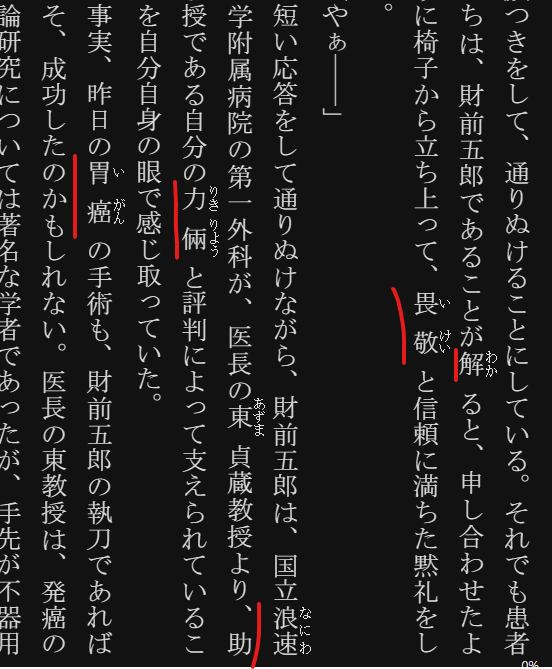
日语的epub文件中有着大量的振假名(ふりがな),但是lingq目前没有适配关于这种“振假名”导入以后的显示方式,这种在日语中类似标注的假名,会直接穿插在汉字之中,非常影响阅读,而且会污染lingq的词汇库,学过日语的,导入过日文epub文件的人会知道我在说什么。
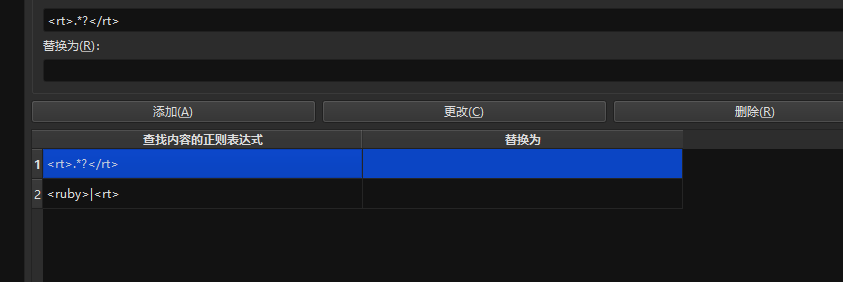
我在询问gemini后总结出了:caliber使用替换正则的方式消除了“振假名”的方法,经过转换以后全部会保留汉字,消除振假名。
可以消除轻小说【ラノベ】的Calibre 正则,,轻小说因为有大量的片假名,平假名,我询问了ai很多问题,经过大量的试错,我使用这套正则消除了轻小说中的“振假名”,现在我的图书中,那些烦人的振假名终于消失了
<rt>.*?</rt>
<ruby>|<rt>
如果lingq团队看到,希望你们可以套用这套正则,替换到导入插件的规则里面,从而能够屏蔽振假名,学过日语的,都知道日语汉字中穿插着假名有多么烦
如果看不懂,也可以看这段:
Translating the provided Chinese text into English:
Generally, the regular expressions used to replace furigana in Japanese light novel EPUB files aren’t necessarily more complex, but they do need to be more precise because the formatting may not be standardized.
In most cases, using the regular expression <rt>.*?</rt> to remove the furigana itself is the most efficient and reliable method. The logic of this regex is to directly locate and remove the <rt> tag and its content, regardless of the surrounding <ruby> tag structure.
Why is more precision needed?
Light novel EPUB files are often created by individuals or groups, so their HTML structure may not be uniform. This can lead to a few situations:
- Furigana splitting for multi-syllable kanji: The furigana for a single word might be split across multiple
<rt> tags, for example: <ruby>日<rt>に</rt>本<rt>ほん</rt></ruby>. If you only replace the <ruby> tag, it could cause errors.
- Non-standard tags: Some creators might not use the standard
<ruby> and <rt> tags, instead using <span> tags and CSS classes to mark furigana, for example: <span>漢字</span><span class="furigana">かんじ</span>.
- Nesting and mixing: The
<ruby> tag might contain other nested tags, making it difficult for a simple regular expression to match everything at once.
A More Reliable Replacement Strategy
Due to the complexities mentioned above, a two-step replacement is the best practice for handling Japanese light novel EPUBs, as it can adapt to various non-standard formats.
-
Step One: Remove Furigana Content
- Search for:
<rt>.*?</rt>
- Replace with: (Leave blank)
This regex can precisely remove all furigana, regardless of the external structure.
-
Step Two: Remove Remaining Tags
- Search for:
<ruby>|<rb>|</ruby>|<rt>
- Replace with: (Leave blank)
This step is for clearing any leftover tags like <ruby> to ensure the text is clean.
This two-step method can solve the furigana problem for the vast majority of Japanese light novel EPUBs. If this method still doesn’t work, it means the EPUB format you have is highly unique, and you’ll need to use Calibre’s “Edit book” feature to directly view the source code and adjust the regular expression accordingly.
1 Like