Hi everyone,
I just want to share a very simple way to loop sentences on LingQ.
No complicated setup.
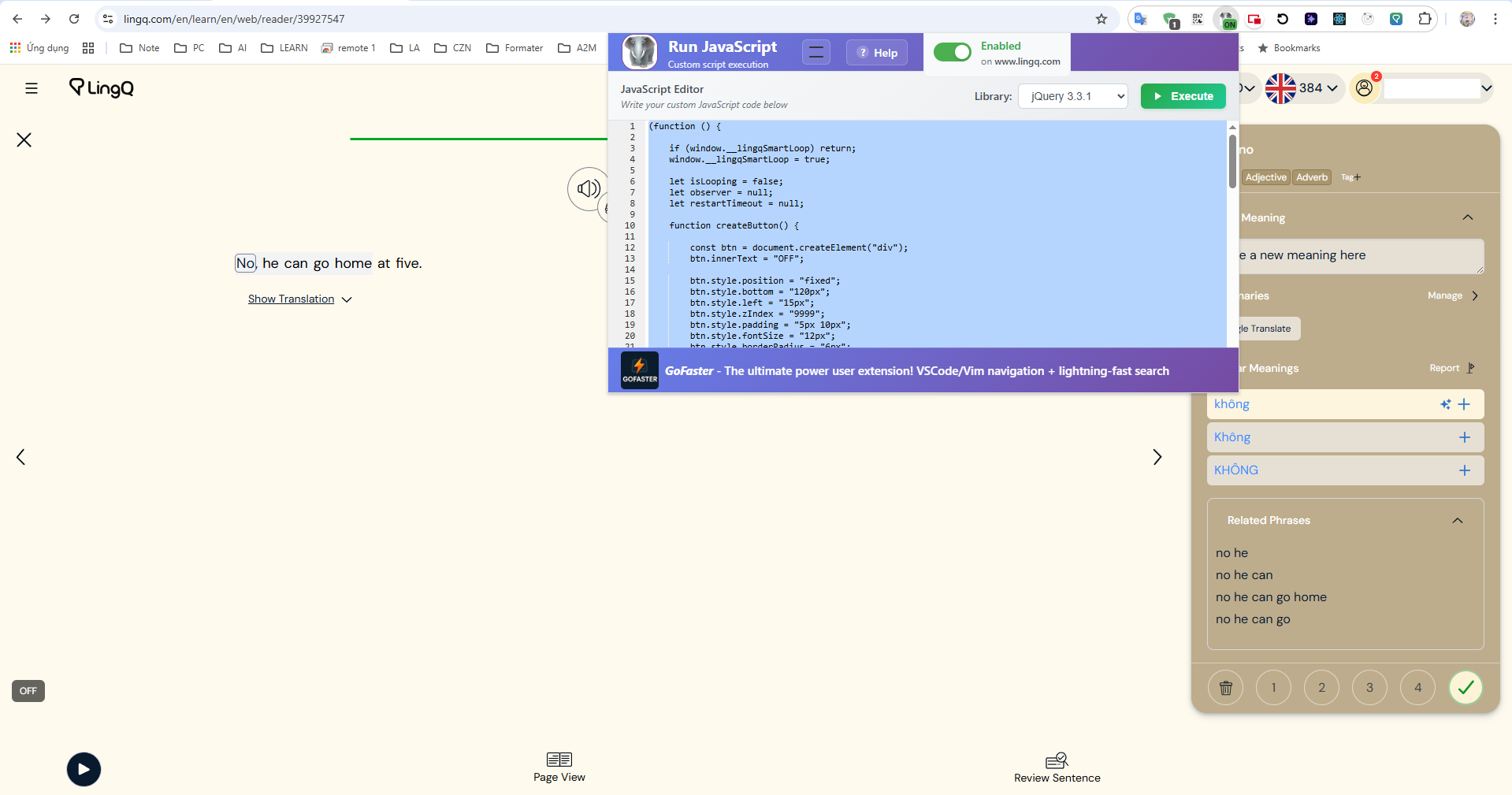
Just install one extension, run the script once, and you’ll get a loop button on the screen.
 What This Does
After you enable it:
-
A small ON/OFF button appears on the lesson page
-
When ON → the current sentence keeps repeating automatically
-
When OFF → LingQ works normally
 Important:
To stop looping, you must press the added ON/OFF button.
The normal LingQ stop button will NOT stop the loop.
 How To Install
 Install this Chrome extension:
Run JavaScript – Custom script execution
(You can find it in Chrome Web Store.)
 Open a LingQ lesson
Go to any lesson page.
 Open the extension
-
Click the extension icon
-
Select library: jQuery 3.3.1
-
Paste the script (see below)
-
Click Execute
Done 
You will see a small button appear on the screen
 Script
Paste this into the extension:
(function () {
if (window.__lingqSmartLoop) return;
window.__lingqSmartLoop = true;

let isLooping = false;
let observer = null;
let restartTimeout = null;

function createButton() {

    const btn = document.createElement("div");
    btn.innerText = "OFF";

    btn.style.position = "fixed";
    btn.style.bottom = "120px";
    btn.style.left = "15px";
    btn.style.zIndex = "9999";
    btn.style.padding = "5px 10px";
    btn.style.fontSize = "12px";
    btn.style.borderRadius = "6px";
    btn.style.background = "rgba(0,0,0,0.6)";
    btn.style.color = "#fff";
    btn.style.cursor = "pointer";
    btn.style.userSelect = "none";

    btn.onclick = function () {

        isLooping = !isLooping;
        btn.innerText = isLooping ? "ON" : "OFF";
        btn.style.background = isLooping
            ? "rgba(0,150,0,0.7)"
            : "rgba(0,0,0,0.6)";

        if (isLooping) startObserving();
        else stopObserving();
    };

    document.body.appendChild(btn);
}

function startObserving() {

    observer = new MutationObserver(() => {

        const btn = document.querySelector('.play-button, .pause-button');
        if (!btn) return;

        if (!btn.classList.contains("pause-button")) {

            if (restartTimeout) return; // tránh spam

            restartTimeout = setTimeout(() => {

                if (isLooping) {
                    btn.click();
                }

                restartTimeout = null;

            }, 500); // delay 1.5s
        }

    });

    observer.observe(document.body, {
        subtree: true,
        attributes: true,
        attributeFilter: ["class"]
    });
}

function stopObserving() {
    if (observer) observer.disconnect();
    if (restartTimeout) {
        clearTimeout(restartTimeout);
        restartTimeout = null;
    }
}

createButton();
})();