Could stop talking about Mac and PC! It has nothing to do with this thread title.
3 Likes
I love this answer. I need to remember it. That’s exactly it. There is no shortcut or trick. Spending time with the language is learning the language. And that’s what lingq is all about.
2 Likes
I agree with much of your comment, and for sure LingQ can be a very effective and useful tool. Duolingo and other apps such as Busuu and Babbel are junk, in my experience. LingQ for me is a useful reader, that gives quick access to translations of text and words. But I feel I need more structure, just using randon input does not work at all well in the A1 to B1 stages. I cannot speak for others, given that we don’t all learn in the same way.
I do wonder what you mean by traditional grammar first lessons. Where are these taught? I’ve attended school language classes, 50 years ago and evening classes with French schools, 35 years ago, and never seen grammar first lessons.
2 Likes
There lot of complaints of LingQ in this forum. But it would be interesting to know how representative these complaints are of all LinqQ subscribers. I think not many of those how are satisfied with LingQ, says so here.
I myself is satisfied, and I’m in my second year of subscribing, and I have no ideas of stopping. There are others language apps, which I have looked at, but none of these attracted me.
As old IT-developer, I understand there are technical problems on different platforms, but on PC-Windows which I use, I have no serious problems. Only some minor issues I can live with.
Developing and maintain an app such LingQ is not easy. It was initially created many yeas ago, and it should probably be redesigned and rewritten from the ground. But such task would be very cumbersome and expensive, And the customers don’t want to pay for it. Same thing can be said about many old applications.
6 Likes
And don’t forget what the purpose of LinqQ is. Does LingQ fulfil it? I think so.
3 Likes
From comments on this forum, it seems that the iOS app has more bugs than the other apps. Currently when I watch a video, at the end of my session I have to do a screen dump, as the next time I open the video, it starts back at the beginning. The screen dump allows me to find my place in the video.
I currently use LingQ with German videos in simplified language for learners, and it is extremely useful.
I used to write PC software, and the Microsoft tools and frameworks I used are extremely good. I have written some simple software for iPad and the iPhone, and I found it much harder, the frameworks seemed much less sophisticated. And of course LingQ is very ambitious, they have multiple apps and a HTML interface, and I suspect the amount of effort that goes into minority languages such as Irish does not generate enough income to cover the costs incurred.
1 Like
If all you’re doing is reading and listening to playlists I generally find the iOS app much preferable to the browser version. I use the brower version when importing lessons almost exclusively - transcribing and downloading audio and then importing manually, but that’s it.
For quick text-only import, I find sharing the article from browser to iOS app is usually flawless.
2 Likes
You’re really awesome. I had learned Russian for the same period but I’m know just A2 (it’s ashame).
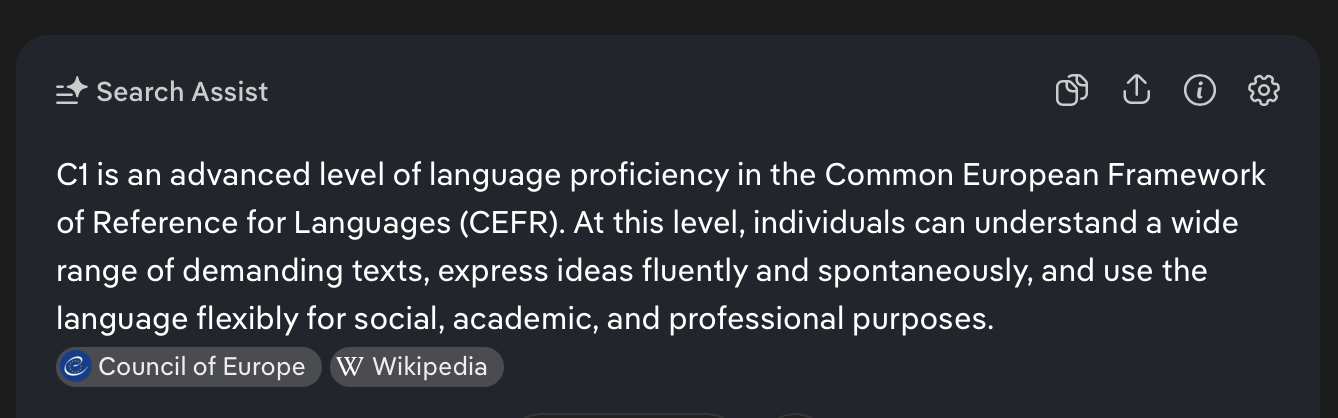
C1 is a very high bar. I’ll be lucky if I ever get there with Russian. All I can do is keep moving forward. If you’re at A2, congratulations! Keep going.
1 Like
I have used LingQ for two years, and I like it very much.
Indeed. The requirements specified there (“can understand a wide range of demanding texts”, “can use the language for … academic and professional purposes”) is something that goes beyond the level even of quiet some native speakers, including most adoloscents. Those individuals are nevertheless fluent speakers.
So when thinking about what level one might be aiming for in language learning, getting an idea of the level one has in the mothertongue is propably a good idea. Native doesn’t mean one is automatically C2.
3 Likes
The CEFR is of course not intended for assessing native speakers. An advanced L2 speaker might have a better command of more formal language than the average L1 speaker, but make occasional mistakes that a native speaker would never make, and not have quite the same level of comprehension of day to day language, or have the same breadth of vocabulary. I don’t think I ever use C2 language in my L1, it’s mostly at a B2 level. But a politician or a lawyer may well use C2 level language every day as part of their job.
I would like to take a CEFR exam in both of my foreign languages, but I’m not convinced it’s worth going beyond B2, a high level of comprehension of day to day language and a good accent is my aim.
2 Likes
I’m only an early intermediate or good beginner in tagalog and am learning here. I like reading and am reading a lot (but find myself translating a ton since it’s so different to English and many of the words look and are the same but different in diff contexts, mahal for example).
I’m learning because my wife is from the Philippines and I want to understand yung pamilia niya more and teach our kids one day. Did you do listening/reading/ anything else? What was your strategy and how long did it take to get to a more conversational level where you’re using the linkers or know more verbs to express yourself with fluent speakers?
I haven´t personally experienced so many. Which ones have u?
Some current iOS bugs:
A dialog regularly pops up asking if I want to reposition the video.
After a while the UI goes squiffy, for example clicking on a word does not bring up a definition. I have to shut down the lesson and reload.
When I open a video, it starts at the beginning, not the last position. I have to screen dump my last position so I know where to pick up.
Often the sound stops, even though the video is playing. I have to shut down the video, and reopen it.
In sentence mode, often the sound that text reading starts in the middle of rhe sentence, or half way through the previous sentence.
In sentence mode, if I edit the text, because a word is wrong for example, when I click on save, it shoots back to an earlier sentence. It can be very hard to relocate my position.
When I click on a word, often the dialog pops up with just the AI definition. It can take a very long time for the non AI definitions to appear.
If I’m listening to a video, and an urgent email comes in, and I switch to email, then back, when I select play, the video shoots back to the beginning. It often took several minutes to locate where I was. I now switch to sentence mode and back as a workaround.
The above are just the bugs I can think of right now. Some have been present for years. When I mentioned some of them, one LingQ employee just said that’s the way it’s supposed to work, I’m using it wrong. I found that unhelpful, to put it politely.
2 Likes
Which platform are you using? Which browser?
iOS on iPad, LingQ app. Should have said I use the app. The browser interface just didn’t do what I needed when I last tested it.
Yah. I’ve had better luck with the iOS app. I used the web version typically only to import new lessons.
Great concept, but poorly executed. It’s perpetually the shaky beta version of an app that could be great.
It’s sort of like a garage band that could be Rock stars if they would just stop trying to play beyond their ability, and settle into a groove where they can actually perform well.
7 Likes
4 Likes