[Deleted by author, because the point was made already in a prior post by another user, which the author did not see priviously.]
(ignore outdated topic)
(ignore outdated topic)
(ignore outdated topic)
Can I just set it to move all blue words to yellow at level 1?
(To save having to click on lots of words but not ruin the known words list.)
The short answer is no - I think if you give the ‘manual’ rating and definition system a chance, you’ll quickly find:
- the interface is already pretty efficient to quickly load into your personal database and get on with reading / listening
- once you work through the first few hundred common words, you’ll only be encountering a relatively small number of new words, at which point it actually becomes very important to be able to find these and spend a moment digesting the meaning
- for example, these days before I start some listening practice, I scan through the text quickly and specifically to hunt down the blue words so that I have some base understanding while trying to listen
- the flexibility of defining your own meaning also becomes very important:
- words can have different meanings (with syntax/grammar or semantic)
- allows you to handle edge cases in punctuation, hyphens, spelling errors, different writing styles etc.
- your preference for the “type” and detail of definition you want will evolve with your level of understanding!
Here is an example of how the volume of blue words / admin changes once you are through the initial hurdle:
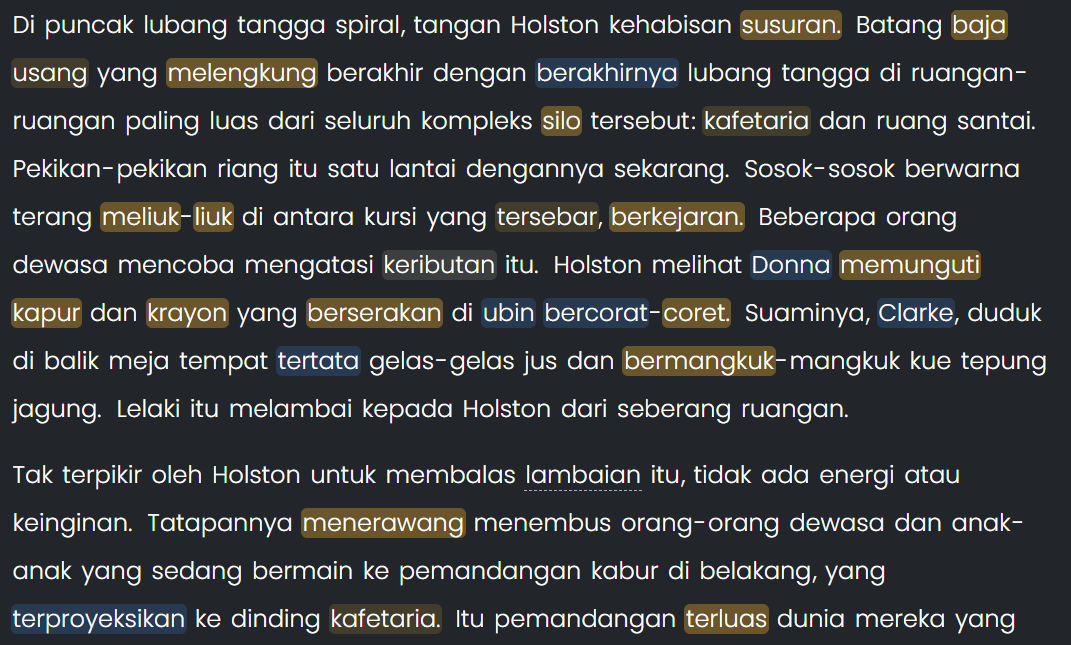
Finally, this video is a good walk through of the “entire system” – the selection and progress of the numbers is only a very small part of it.
@zorbital I’m not sure, if you know, maybe I misunderstood your posts so far, so feel free to ignore this, but when you just move a blue word to level 1 by clicking on the circled “1”(without inserting a definition or chosing one of the shown definition list), the system always picks the first definition in the (user created) list of translations by default. That way this translation will be shown in your vocabulary list. And in sentence mode this definition is shown everytime when that particular lingQ is part of a sentence. The vocabulary list is meant to show all your words for which you created lingqs → meaning, every word that you changed from blue to 1/2/3 or 4 once. Based on this vocabulary list users are able to use the vocabulary revision option. Not everyone is doing that, of course. But if a user wants to use that feature, they need do chose or create the translation that fits best for the chosen lingq.
So, if you never use the vocabulary list (for review or collecting data) and never use sentence mode (with shown translations), changing a blue word to yellow by just clicking on 1 is alright. At the same time your amount of created lingQs will rise and also your amount of collected coins will rise everytime you change the level of a word to a higher one. This is just what the LingQ-idea is based on. But there are a lot of users, who use the programm differently. Choose the process that works for you.
(ignore outdated topic)
I’ve been following this thread for a while and, no offense, I think you might be overreacting a bit. Thousands of people use this platform, and I’ve never once heard anyone say that saving a translation on top of deciding whether you know the word is too much work. But trust me, I remember being a new user and griping about the website myself (seriously you should see my first few forum posts) when I didn’t fully understand how things worked.
Another user @chytran and I agree that, in practice, only the first few statuses (1–3) really matter. After that, you basically know the word.
Personally, unless a word is genuinely troublesome, I almost never bother moving it around between the middle statuses. I just wait until I clearly know it and mark it as Known. It’s really not complicated, and it’s far from hard labor.
If the system feels too heavy for you, it might simply not be the right method — some people prefer pure SRS or other approaches.
EDIT: And I’d argue you probably couldn’t find a faster method for vocabulary acquisition than LingQ if you know how to use the site properly. Trust me — it just takes a bit of time to get used to. 

(ignore outdated topic)
Hi again. When you select a blue word and choose to mark it directly as known ( = the checkmark/k) , then there will be no translation saved with it → so no entry in the vocabulary list. And you get 5x the coin-worth of that word added to your coin collection.
But when you later stumble over word and you decide that you don’t know the word anymore, and you change the knowledge level back to 1-4, automaticly, the first definition in the popular meanings list is chosen as the lingQ translation*. You can change it after or leave it be.
Oh, and depending on your individual reader settings, the top definition in the popular meanings is either the one that was chosen by the most users or a AI-definition.
- [And your coins decrease accordingly.]
(ignore outdated topic)
If you’re using the shortcuts, you can just click a number 1, 2, 3, 4. It will automatically add the “top” meaning. I don’t think there’s a way to add a blank meaning, but if you really don’t care what it chooses…the “top” meaning in most cases will be a decent choice anyway. Sounds like you’re just looking for the speediest proposition if I’m understanding what you’re driving at. This is similar to how I work, although maybe 1 in 10 (or maybe less frequent) I do add one or two extra meanings but that doesn’t take long either. You can also traverse the meanings – up and down arrow if you want to choose something quickly…highlight word, up or down arrow to best meaning, then hit number to update. Otherwise it will just select the top one as mentioned when you click the number via keyboard or mouse click.
(ignore outdated topic)
Yeah, you have to decide how you want to mark them known. When I first started I was like you and wouldn’t mark it known until I felt like I could “use” it. There are plenty of others that do it this way too.
Since I felt like this definition of being able to “use” was very imprecise I spent way too much time contemplating what level I should set the word to, or when to mark known. I ultimately decided I would mark it known when I could see it and identify the meaning. Ultimately I changed my definition of known, if I understood the word in context. This simplified things a lot.
The thing is you will know a lot more words passively (not being able to use them for output) than actively (using for output). LingQ really does a better job of measuring passive capabilities in my opinion. The whole thing is structured for input, so better to just measure that way.
(ignore outdated topic)
Yeah. Try it out and see how you like it. But it’s definitely not gospel. Others do things entirely different and I suspect make progress, but I think many longtime Lingq’ers work in a similar fashion to what I describe (or even simpler).