Yeah. Try it and leave a short review 
Bear in kind that web add ons do not work in iOS e.g. iPads. Sadly.
Did you try this one?
Before making improvements or implementing new things, it would be a good idea to fix old bugs and annoyances that have now persisted for years and still haven’t been resolved.
For example, the Pinyin of the Chinese character 给 or 給 in LingQ is always written as jǐ, not gěi. However, the pronunciation jǐ only appears in 供給 gōngjǐ !
Is this so difficult to fix?
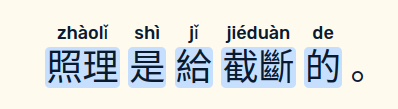
jǐ must be gěi
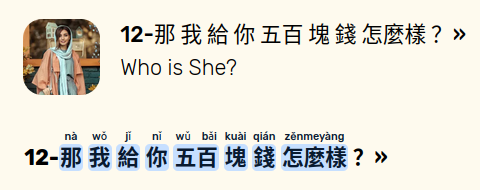
jǐ must be gěi
The built in TTS voices can be used already → Settings → Reader → Voice → Use Web Voices (Off)
We will see if scrolling is possible but this is more tricky to enable with some of the features we offer. We are aware of this desire and will see what’s possible going forward. As for EPUB files, we will try to improve this when we can.
This doesn’t work and never has. I am on iOS and even when I select the built-in voice and turn off the web voice, I always end up with the robotic web voice anyway. I had raised the issue months ago, but nothing was ever done.
Also the option doesn’t even exist on Android.
Which language are you in?
Also, where are you trying to access the TTS? It works for words and sentences but not full lesson audio.
I am learning Korean. But even for individual words, I end up with a robotic voice, not the ipad’s built-in premium voice.
@SeoulMate Would you please email us via the app (Settings → App → Email Support), and I’ll try to get you sorted out? It appears to be working properly on all our devices. We’ll probably need screenshots of all your iOS settings, app settings, etc.
In case you are referring to a request by me, I have frequently requested a single screen- button and a shortcut (alt+ something) to:
-go to the next sentence when in sentence mode; and
-show the transcript; and
-play the audio (native or not computer TTS).
This supports comprehensible input for difficult texts and should in my opinion be a very high priority. I do this with hardware which is geeky and awkward - I can’t recommend Lingq strongly until this is implemented.